Pet Caregiver Acknowledgment in 10 Minutes for Solo Owners, No Smartphone Needed
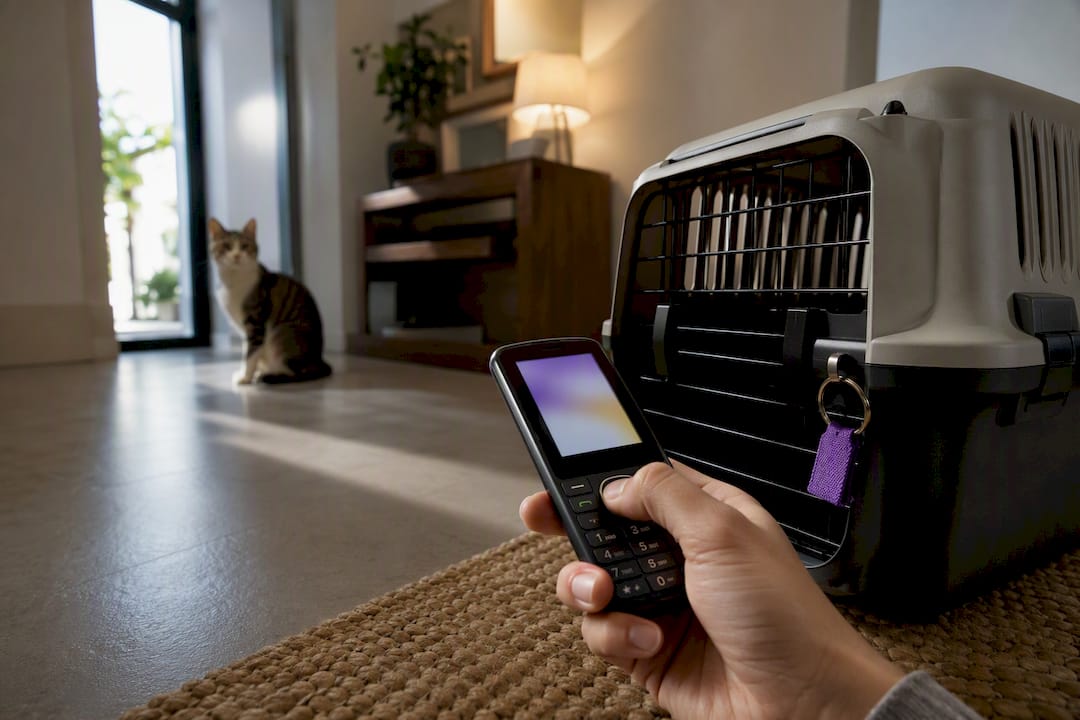
Pet caregiver acknowledgment is a designated caregiver’s confirmation, made after receiving an emergency alert, that they will check on your pet and take over care right away. The immediate next step is simple: set up an automated wellness check, name one caregiver who understands this role, and get their explicit acceptance in writing. MyPetsSafetyNet is built around exactly this workflow, but the principle matters no matter which tool you use.
TL;DR:
- Automated wellness check-in systems can reduce the response window from days to hours, which is critical for timely pet assistance during emergencies.
- A valid caregiver acknowledgment must include clear acceptance wording, access details, medical information, and transport instructions to be effective in crises.
- Setting up the system involves naming two caregivers with explicit written consent, building a detailed caregiver packet, and testing the process with simulated missed check-ins.
- Combining digital logs with physical documents, such as laminated pet cards and signed authorization letters, ensures acknowledgment is reliable even if technology fails.
- Regular maintenance and clear communication of responsibilities prevent plan breakdowns, with response windows typically set between one and two hours for optimal effectiveness.
Table of Contents
- Why Pet Caregiver Acknowledgment Matters More Than You Think
- What Belongs in a Valid Caregiver Acknowledgment
- How Automated Check-Ins Turn Into Logged Acknowledgments
- Step-by-Step Setup Checklist for Caregiver Acknowledgment
- Documentation and Legal Backup for Your Caregiver Plan
- Testing and Maintaining Your Acknowledgment System
- What a Caregiver Is Actually Responsible for After Acknowledging
- How to Confirm Acknowledgment Without Guessing
- What Happens Without Proper Acknowledgment Documentation
- Digital Versus Physical Acknowledgment: Using Both Well
- A Missed Check-In That Ended Well
- Let MyPetsSafetyNet Handle the Acknowledgment Loop for You
- Where to Verify This Guidance and Find Templates
- Sources
- FAQ
Why Pet Caregiver Acknowledgment Matters More Than You Think
A missed check-in and a confirmed acknowledgment are two very different situations. One means your pet’s fate is unknown. The other means someone is already on their way.
Without an early-warning system, hours of silence can stretch into days before anyone notices something is wrong. Preparedness guidance from Disability Rights Texas warns that pets left out of emergency planning cause delayed evacuations and more harm to both animals and their owners. An acknowledgment closes that gap the moment it happens.
The gap that acknowledgment closes: Automated check-in systems narrow the window between an emergency and help from days down to hours by triggering alerts the instant a response is missed. That difference often decides whether a pet sits alone through a weekend or gets fed within the hour.
For a solo pet owner living alone, that shift from “unknown” to “acknowledged and handled” is the entire point of building this system in the first place.
What Belongs in a Valid Caregiver Acknowledgment
An acknowledgment isn’t just a “yes, I got your message” reply. To actually work in a crisis, it needs specific information attached to it, so your caregiver isn’t standing at your door with no idea what to do next.
A complete acknowledgment package should include:
- Clear acceptance wording stating the caregiver agrees to act within a defined window, such as two hours of the alert.
- Access details, including where spare keys are hidden, door codes, and where the carrier is stored.
- Medical and behavioral information: medications and dosages, your vet’s phone number, known allergies, and any cues that calm your pet during stress.
- Transport and shelter instructions, covering which vehicle to use, where the carrier lives, and whether a friend, kennel, or boarding facility is the backup plan.
Preparedness checklists from the American Red Cross recommend keeping vaccination records and a laminated photo of your pet with these details, stored somewhere a caregiver can find fast.
Pro Tip: Put a laminated card with your pet’s photo, medications, and vet number right inside the carrier. If your caregiver is stressed or unfamiliar with your home, that card does the thinking for them.
How Automated Check-Ins Turn Into Logged Acknowledgments
The mechanics behind a caregiver acknowledgment are simpler than most people expect. An automated wellness check reaches out to you on a schedule you set, usually once a day, and waits for a quick response.
Here’s the typical sequence:
- Scheduled outreach. The service sends a call, text, or email at your chosen time.
- Simple confirmation. You respond by pressing a key, replying to a text, or tapping a button. No app fluency required.
- Retry attempts. If you don’t respond, the system tries again after a short interval, following your preset response window.
- Escalation. After the retries are exhausted, alerts go out to your named caregivers in the order you chose.
- Acknowledgment logged. When a caregiver responds, the system records the timestamp, their identity, and how they confirmed, whether by text reply or phone tap.
That log matters. Daily check-in services for seniors work on this same escalation model, using a scheduled prompt that shifts to a care group the moment a response goes missing. Nobody has to guess who was contacted or when.
One more thing worth knowing: your pet profile and care instructions stay visible only to the caregivers you’ve named, not to the general public or unrelated contacts. That’s a privacy detail worth confirming with whatever service you choose.
Step-by-Step Setup Checklist for Caregiver Acknowledgment
Getting this system running doesn’t take a weekend. Most solo pet owners can finish the core setup in under an hour.
- Name two caregivers, not just one. Get explicit, written acceptance from each, whether that’s a signed note or a text confirming they understand the responsibility.
- Set your check-in schedule. Choose a time of day, a response window (30 minutes is common), the number of retries, and the order caregivers get contacted if you’re unreachable.
- Build the caregiver packet. Include vet contact info, medication schedules, feeding instructions, and access details. Store both a physical copy at home and a digital copy your caregiver can pull up on their phone.
- Post pet alert cards near entry points, like the front door or a window, so first responders know an animal is inside. Leave a signed letter authorizing your named caregiver to act on your behalf.
- Run an immediate test. Simulate a missed check-in and confirm the alert actually reaches your caregiver and that they know how to acknowledge it.
- Schedule a recurring review, so contact info, medications, and instructions never go stale.
A free pet care card template can speed up step three considerably; it gives you a ready-made format instead of building one from scratch.
Pro Tip: Test your setup on a day when your caregiver is expecting it, then test it again unannounced a month later. The second test tells you if the system holds up under normal, distracted, everyday conditions.
Documentation and Legal Backup for Your Caregiver Plan
Not every safeguard needs to be a legal document. In fact, the simplest tools often work faster in the first critical hours.
- Informal written agreement. A signed note or text thread confirming your caregiver’s willingness to act. Fast to create, easy to update.
- Signed caregiver authorization letter. A more formal version, useful for showing vets, landlords, or first responders that this person has your permission to make decisions for your pet.
- Pet trust. All 50 U.S. states permit pet trusts, making them a durable option for owners who want funds and instructions locked in for the long term, especially in cases of incapacity or death.
Store both physical and digital copies where your caregiver can reach them instantly, not buried in a filing cabinet only you know about. A trust matters most for long-term or worst-case planning; it doesn’t replace the fast, everyday acknowledgment your check-in system generates. Think of the trust as the backstop and the acknowledgment as the trigger. Our guide on pet care emergency documents walks through organizing all of this in one place.
Testing and Maintaining Your Acknowledgment System
A plan that’s never been tested is just a hope. Run a missed-check simulation on purpose: skip a scheduled response and confirm the escalation chain actually reaches your caregiver, and that they know what to do when it does.
Here’s a maintenance rhythm that works for most solo owners:
- Month one: Check the system weekly. New setups have the most kinks.
- Months two through six: Shift to a monthly check to confirm contact info and medication details are current.
- After month six: Move to quarterly reviews once the routine feels stable.
Watch for warning signs that a caregiver needs replacing: slow responses, missed acknowledgments, or a caregiver who’s moved farther away and can no longer reach your home quickly. When that happens, onboard a backup caregiver the same way you onboarded the first, with written acceptance and a walkthrough of the packet.
Pro Tip: Keep a spare “caregiver candidate” in mind before you need one. Replacing an unresponsive caregiver under pressure is far harder than lining up a backup ahead of time.
What a Caregiver Is Actually Responsible for After Acknowledging
Saying “yes” to being someone’s emergency pet caregiver carries real weight, and it helps to spell out what that role actually involves before an emergency, not during one.
Once a caregiver acknowledges an alert, their first responsibility is speed: getting to your home within the agreed response window, not “sometime today.” From there, their job includes physically checking on your pet’s condition, administering any scheduled medication, and following the feeding and exercise routine you’ve documented. If your pet has anxiety or behavioral quirks, the caregiver should know the calming cues you’ve listed rather than improvising.
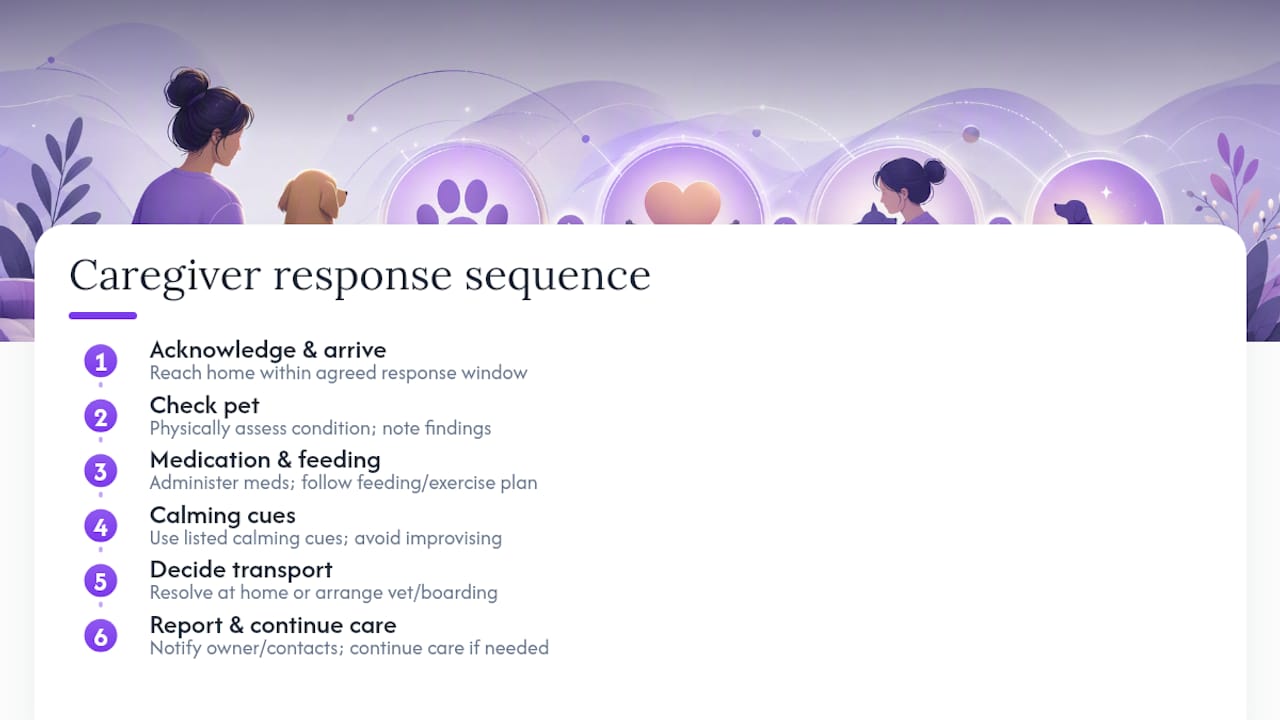
Beyond the immediate check, a caregiver often needs to make a judgment call: does the situation resolve at home, or does the pet need transport to a vet or temporary boarding? That’s why your instructions should specify which vehicle to use, where the carrier is kept, and who to call if boarding becomes necessary.
Communication runs both directions. A responsible caregiver reports back, whether that’s a text to you, your family, or another named contact, confirming the pet is safe and describing what they found. If your emergency extends beyond a day or two, the caregiver’s role expands to ongoing care: feeding schedules, walks, and monitoring for any change in your pet’s condition until you’re able to resume care or a longer-term plan kicks in.
Naming a caregiver without walking through these expectations is where plans quietly fail. A resource like building a backup caregiver plan can help you have that conversation clearly, before it’s needed.
How to Confirm Acknowledgment Without Guessing
The weakest link in most pet emergency plans isn’t the caregiver’s willingness. It’s the vague, one-time conversation that never gets revisited.
Start with a direct ask, not a hint. Instead of “you’d check on Max if something happened, right?” try: “I’m setting up an automated check-in service. If I miss a check-in, you’ll get an alert and I need you to confirm you’ll go to my house within two hours. Can you commit to that?” That framing turns a favor into a role with edges.
Get the acceptance in a format you can point back to later. A text reply saying “yes, I’m in” counts. A signed letter counts more. Either way, keep a copy. Verbal-only agreements tend to fade from memory exactly when they matter most.
Confirmation shouldn’t be a one-time event either. Revisit the arrangement every few months, especially after any change: a new medication, a move, a different work schedule for your caregiver. Ask directly whether they’re still comfortable with the commitment, since circumstances shift and an outdated “yes” can be worse than no plan at all.
Finally, close the loop with a real test. Run the check-in system, let it escalate as designed, and see whether your caregiver responds the way you expect. If they don’t, that’s useful information now, not a surprise during an actual emergency. Our guide to naming pet emergency contacts covers how to prioritize contact order so the right person hears from the system first.
What Happens Without Proper Acknowledgment Documentation
Skipping the documentation step doesn’t just create inconvenience. It creates real risk, both for your pet and for the caregiver you’re relying on.
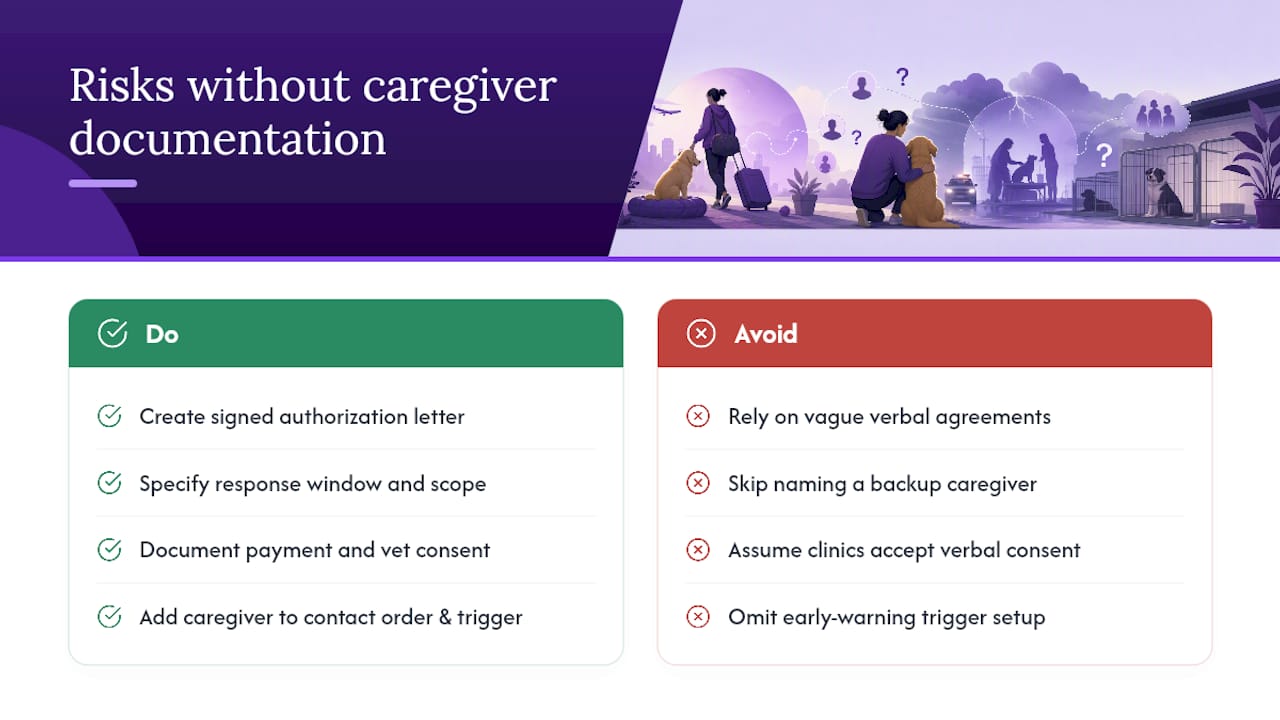
Without a signed authorization, a caregiver may show up at your home and have no legal standing to enter, make vet decisions, or transport your pet. Landlords, neighbors, or even law enforcement may question their presence. A simple signed letter solves this, but only if it exists before it’s needed.
There’s also a practical risk in vague verbal agreements. If a caregiver never explicitly agreed to the response window or the scope of what’s expected, confusion during a real emergency can cost your pet critical time. Pet care planning guidance points out that a documented backup caregiver paired with an early-warning trigger closes the most dangerous gaps in these plans; skip either piece and the whole system weakens.
Financial and medical decisions carry their own liability questions. A caregiver authorizing emergency vet treatment without documented permission may face resistance from the clinic, or find themselves personally on the hook for costs they assumed you’d cover. Outlining payment authorization and vet consent in your caregiver packet prevents that scramble.
There’s also the risk of the plan simply not activating. A caregiver who was never clearly told they’re the primary contact, or one who wasn’t added to your check-in service’s contact order, may never receive an alert at all. The documentation isn’t a formality. It’s what turns a good intention into something that actually functions during a crisis.
Digital Versus Physical Acknowledgment: Using Both Well
Neither format wins outright. The strongest plans lean on digital tools for speed and physical documents for backup when technology fails or a stranger needs answers fast.
Digital acknowledgment, through text replies, app confirmations, or logged phone responses, offers speed and a built-in record. Every response gets timestamped automatically, so there’s no ambiguity about who confirmed what and when. This works especially well for the initial alert and confirmation loop, since it requires no smartphone sophistication. Even a basic flip phone can handle a call or text confirmation.
Physical documentation earns its place in the moments digital systems can’t reach: a first responder standing at your door, a neighbor who doesn’t have your caregiver’s phone number, or a power outage that knocks out your internet. A laminated pet alert card posted near your entryway, along with a signed authorization letter tucked inside your pet’s carrier, works even when nothing digital does.
The practical move is layering both. Use an automated check-in service for the fast, logged acknowledgment loop, and back it up with printed pet alert cards, a signed letter, and a paper copy of medical instructions stored somewhere obvious. If your emergency involves specific permissions around pet movement or transport, documents like an APHIS 7001 form may also apply depending on your situation. Neither format alone covers every scenario a solo pet owner might face.
A Missed Check-In That Ended Well
A woman living alone with her senior cat set up a daily wellness check and named her sister as the primary caregiver. One morning, she didn’t respond. After two missed retries, the system alerted her sister, who confirmed she was on her way and arrived within the hour to find her sister had fallen and needed help. The cat was fed, medicated, and calm by the time paramedics left.
What made this work wasn’t luck. It was the response window, the caregiver’s prior acceptance, and a packet with the vet’s number already written down. The takeaway is straightforward: none of it matters if the caregiver hasn’t already agreed, in writing, to act.
— MyPetsSafetyNet
Let MyPetsSafetyNet Handle the Acknowledgment Loop for You
MyPetsSafetyNet is built specifically around this workflow: automated wellness check-ins that escalate to named caregivers, without requiring a smartphone or any app fluency from you or the people you’re counting on. It manages up to five pets and three emergency contacts, with a customizable countdown, response window, and contact order you set once and adjust anytime.

Setup takes less than 10 minutes, and the caregiver packet generator turns your pet’s medical details, vet contact, and access instructions into something a caregiver can actually use under pressure. If texting works better for your household than calls, the SMS-based check-in option covers that too, with clear consent built in. Start with the free pet care card to build your caregiver packet today, then try the full check-in system with a 7-day free trial, no credit card required, at $6.99 per month after your trial ends. Name your caregiver, run your first test, and see the acknowledgment come through in real time.
Where to Verify This Guidance and Find Templates
For official preparedness backing, the American Red Cross’s combined toolkit and Disability Rights Texas’s pet disaster guidance both cover pet-inclusive emergency planning in more depth.
For ready-to-use templates, MyPetsSafetyNet’s guides on emergency pet care plans and what happens if you’re hospitalized walk through the same setup covered here, with printable formats you can start using right away.
Sources
- American National Red Cross / Prepare.org (combined toolkit)
- Preparing animals & pets for disasters — Disability Rights Texas
- Automated Check-in Services in 2026 — ConfirmOk
FAQ
What Is Pet Caregiver Acknowledgment?
It’s a caregiver’s confirmed response to an emergency alert, agreeing to check on and care for your pet within a set time frame. It typically includes a timestamp, the caregiver’s identity, and how they responded, whether by text, call, or app tap.
How Fast Should a Caregiver Acknowledge an Alert?
Most setups use a response window between one and two hours, though you can customize this based on your caregiver’s proximity and your pet’s needs. The important thing is agreeing on that window in advance, not deciding it during an actual emergency.
Does MyPetsSafetyNet Require a Smartphone?
No. MyPetsSafetyNet works through SMS, phone calls, or email, so neither you nor your caregiver needs a smartphone or app fluency. Plans start at $6.99 per month with a 7-day free trial and no credit card required.
What if My Caregiver Doesn’t Respond to an Alert?
The system follows your preset escalation order, moving to your second named caregiver if the first doesn’t confirm within the response window. That’s why naming at least two caregivers, not one, matters for a reliable plan.
Is a Verbal Agreement Enough for Caregiver Acknowledgment?
A verbal “yes” is a starting point, but it fades and carries no legal standing during a real emergency. A signed letter or documented text acceptance, paired with an automated check-in system, gives your caregiver something concrete to act on.