Senior Pet Owner Alerts That Call Your People, Not 911
Senior pet owner alerts are automated wellness check-in services that contact you on a schedule and, if you don’t respond, notify your emergency contacts with the pet-care details they need to step in. The right move is simple: enroll in a check-in service and build a prepared, reachable care circle before you need either one. MyPetsSafetyNet is built specifically for solo, senior, and disabled pet owners who want this protection without managing it themselves.
TL;DR:
- Contact escalation works best when contacts are local, reliable, willing to act, and arranged in order of fastest response times.
- Regular testing and updating of contact information and pet details are crucial to maintain system effectiveness and prevent failure.
- Data privacy and security depend on encryption, controlled access, and transparent policies; sharing sensitive information carries inherent risks.
- Subscription costs vary based on features like pet and contact support, with higher tiers offering more detailed profiles and multiple pets.
- Automated check-ins complement a prepared care circle but cannot replace the need for human response and local, reachable contacts.
Table of Contents
- How Do Automated Wellness Check-In Alerts Work?
- How Do You Build a Reliable Care Circle?
- What Belongs in a Pet Profile and Emergency Card?
- How Often Should You Test and Update Your Alert System?
- Is Your Data Safe With an Automated Check-In Service?
- What Do Senior Pet Owner Alert Services Typically Cost?
- What Support Can You Expect If an Alert Fires?
- How Do You Compare Different Alert Service Providers?
- Why Automation and a Prepared Care Circle Work Better Together
- Getting Started With MyPetsSafetyNet
- Sources
How Do Automated Wellness Check-In Alerts Work?
The mechanics are simpler than most people expect. You set a schedule, the system checks on you, and if you don’t answer, it moves down a contact list until someone confirms you and your pets are okay.
Most services follow this same basic structure:
- A scheduled prompt arrives by SMS, phone call, or email at a time you choose.
- You confirm you’re fine with a simple reply, tap, or button press.
- If you don’t respond within a set grace period, the system sends a reminder before escalating further.
- Unanswered reminders trigger automatic alerts to your designated emergency contacts, often paired with pet-care details so the first person to arrive knows exactly what to do.
- Many platforms use tiered escalation, so if your first contact doesn’t respond, the alert moves to the next person in order until someone confirms you’re safe.
Here’s the part worth understanding clearly: these services don’t call 911 for you. They call your people. That distinction shapes everything about how you should set this up, because the entire system depends on the humans you choose and whether they actually pick up the phone.
How Do You Build a Reliable Care Circle?
A check-in service is only as good as the people it alerts. If your first contact is on a cruise ship or your second lives four states away, the system can escalate perfectly and still fail you.
Start by choosing contacts against four criteria:
- Local proximity. Someone who can physically reach your home within an hour beats someone who loves you from 300 miles away.
- Reliability. Pick people who actually answer their phones and check messages, not just people you trust in principle.
- Willingness to act. Confirm they’re comfortable entering your home, handling your pet, and making short-term care decisions.
- Redundancy. Line up at least two or three contacts, ranked in the order you want them alerted, so one unreachable person doesn’t stall the whole chain.
Once you’ve picked your circle, prepare them properly. Give each contact a spare key or the garage code, walk them through where supplies are kept, and tell them plainly what you’re asking of them if they get the call. Then schedule a test run. Send a practice alert, watch how fast each person responds, and adjust your order based on what actually happens rather than what you assumed would happen.
Cadence matters too. A daily check-in at a set time works well for someone living alone with health concerns. An “away timer” style alert, similar to the timer-and-GPS features found in some pet safety apps, fits shorter windows like a walk, an errand run, or a medical appointment where you want a safety net without a full daily commitment.
Pro Tip: Rank your contacts by response speed, not emotional closeness. The sibling who answers texts in two minutes should outrank the best friend who checks their phone once a day, no matter how close you are to either one.
For a deeper breakdown of vetting and briefing contacts, Mypetssafetynet’s guide on pet care network best practices walks through the conversation scripts worth having before an emergency, not during one.
What Belongs in a Pet Profile and Emergency Card?
Whoever answers your alert needs more than an address. They need enough information to walk in and take over care within minutes, not hours.
Build your profile around these categories:
- Identification: current photos, microchip number, breed, weight, and any distinguishing marks.
- Medical basics: your vet’s name and phone number, existing conditions, current medications with exact dosing, and proof of vaccination.
- Daily care: feeding schedule and portions, bathroom routine, exercise needs, and any behavior cues or triggers your pet has, including what calms them down.
- Access logistics: where food and medication are stored, house key location, alarm codes, gate instructions, and your preferred transport method if the pet needs to leave the home.
Store this information somewhere your contacts can reach instantly, whether that’s a secure digital pet vault, cloud storage folder, or a printed card taped inside a kitchen cabinet. A digital vault paired with a physical QR tag on your pet’s collar gives a rescuer or neighbor a way to pull up care instructions instantly, even before your emergency contacts arrive. That layered approach, digital plus physical, closes the gap for the person who finds your pet first but isn’t on your contact list at all.
Mypetssafetynet’s pet care plan guide for people living alone includes a printable version of this checklist if you’d rather start from a template than build one from scratch.
How Often Should You Test and Update Your Alert System?
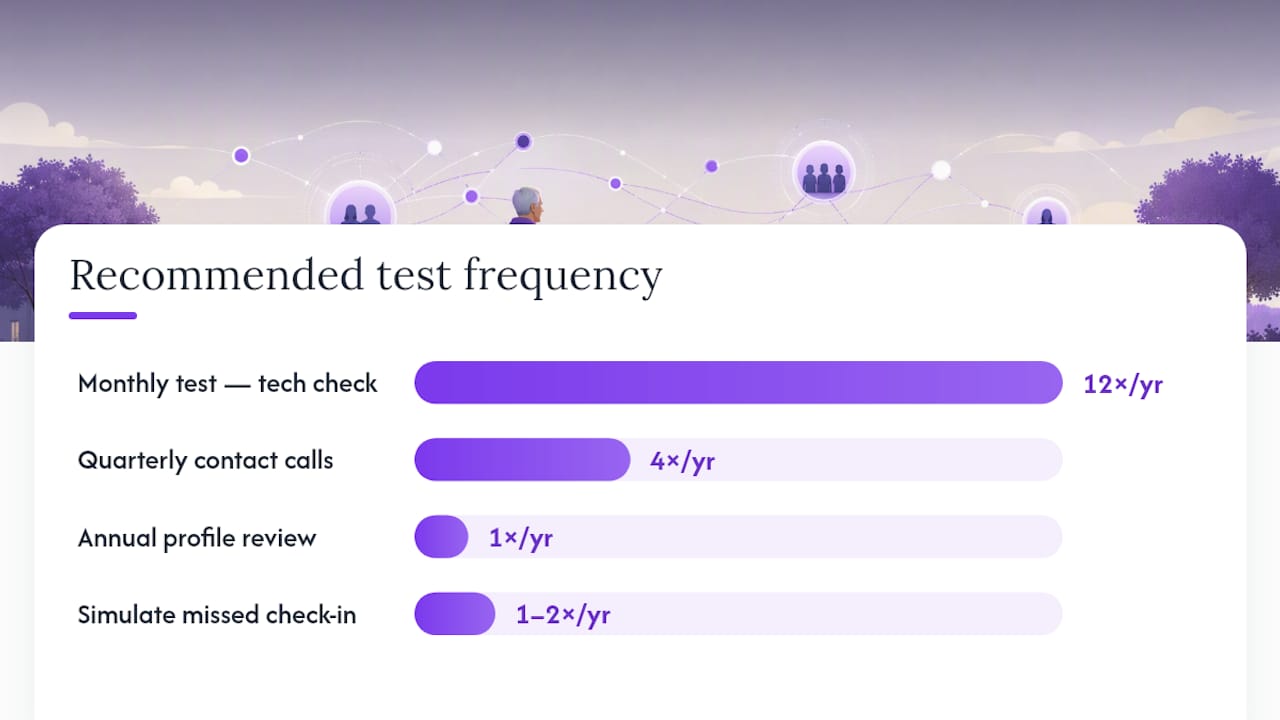
A system you set up once and never touch again is a system that quietly stops working. Phone numbers change, people move, medications get adjusted. None of that updates itself.
Build maintenance into your calendar:
- Monthly: send yourself a test check-in message to confirm the technology still works as expected.
- Quarterly: call each emergency contact to confirm they’re still local, still willing, and still know where the spare key is.
- Annually: review the entire pet profile for outdated medications, an old vet address, or a microchip number you never actually verified.
Simulating a missed check-in once or twice a year is worth the mild awkwardness. Watching your own escalation chain fire in real time tells you whether contact number two actually picks up, and whether your instructions make sense to someone who didn’t write them.
The most common point of failure isn’t the technology. It’s an unreachable contact, a single point of failure where only one person has a key, or instructions so vague that a well-meaning neighbor doesn’t know where to start. Because these systems rely on your chosen circle rather than dialing emergency services directly, a prioritized, tested, and genuinely local contact list eliminates most real-world failures before they happen.
Why local contacts matter most: Check-in services flag reachable, local contacts as the single biggest factor in whether an alert actually results in someone showing up. A contact three states away can confirm you’re loved. Only a nearby one can confirm you’re safe.
Is Your Data Safe With an Automated Check-In Service?
Sharing medication lists, house access codes, and vet records with a subscription service is a reasonable thing to hesitate over. You’re trusting a company with information that matters.
Look for a few concrete signals before you commit. Does the service encrypt data in transit and at rest? Can you control exactly which contacts see which details, so a dog walker doesn’t need your alarm code and a distant relative doesn’t need your medication list? Is there a clear policy on how long your data is retained if you cancel, and does the company sell or share information with third parties for marketing?
A trustworthy provider will state its privacy practices plainly, not bury them in dense legal language you need a lawyer to parse. You should also be able to update or delete your pet profile and contact list at any time without calling support to do it for you. Access controls matter as much as encryption here: a house alarm code sitting in a shared document with no restrictions is a bigger risk than most people realize until something goes wrong.
Ask specifically how emergency contact notifications are delivered, since a text message containing your address and access instructions should never be sent over an unsecured channel. The safest services treat your pet’s care information with the same seriousness they’d apply to a medical record, because in a real emergency, that’s essentially what it becomes.
What Do Senior Pet Owner Alert Services Typically Cost?
Most automated check-in and alert services run on a monthly subscription model, and the range you’ll see reflects differences in features rather than arbitrary pricing tiers. Basic tiers usually cover a single check-in schedule and a small number of contacts. Higher tiers add multiple pets, more emergency contacts, and richer profile storage for medical details and care instructions.
Free trials are common across this category, giving you a real window to test whether the check-in timing, contact escalation, and notification method actually fit your routine before you commit to paying. That trial period matters more than it might seem: a check-in schedule that sounds reasonable on paper can feel intrusive or, worse, too infrequent once you’re living with it day to day.
When comparing plans, look past the sticker price to what’s actually included. A cheap plan that only supports one pet and one contact isn’t cheaper if you own two dogs and need three backup contacts, since you’ll end up paying for an upgrade anyway. Factor in whether pet profile storage, escalation workflow, and contact management are bundled into your tier or sold as add-ons, since that structure varies a lot between providers and changes what you’re really paying for month to month.
What Support Can You Expect If an Alert Fires?
When an escalation actually triggers, the questions that matter are practical ones. How fast does the notification reach your contacts? Is there a human at the company you can call if something seems off with your account, or is support limited to email tickets with a day’s turnaround?
Response time for the automated alert itself should be near instant, measured in seconds or minutes, since the entire point of the system is speed. Support responsiveness for account issues is a separate matter, and it’s worth checking before you sign up rather than after something goes wrong. Look for services that offer a direct phone line or live chat, not just a contact form, particularly if you’re the kind of subscriber who wants reassurance that a missed check-in or a technical glitch will get a quick human response.
It’s also worth understanding what the service can and cannot do in the moment. No automated platform dispatches paramedics or animal control on your behalf. Support teams can usually help you fix account settings, troubleshoot a notification that didn’t go through, or walk you through updating a contact list, but the actual emergency response still depends on the people in your care circle showing up. Ask any provider directly what their support hours look like and whether that coverage extends to weekends and holidays, since emergencies don’t wait for business hours.
How Do You Compare Different Alert Service Providers?
Not every check-in service is built the same way, and the differences matter more once you’re relying on one daily. A few criteria separate a genuinely useful service from one that looks good in an app store listing but falls short in practice.
Start with escalation flexibility. Can you set your own grace periods and reorder your contact priority as circumstances change, or is the sequence fixed by the provider? Next, check how many pets and contacts a plan actually supports, since a household with two cats and a dog needs different coverage than someone with a single pet. Profile depth matters too: a service that only stores a name and phone number is far less useful than one that lets you attach medication schedules, vet records, and access instructions directly to the alert.
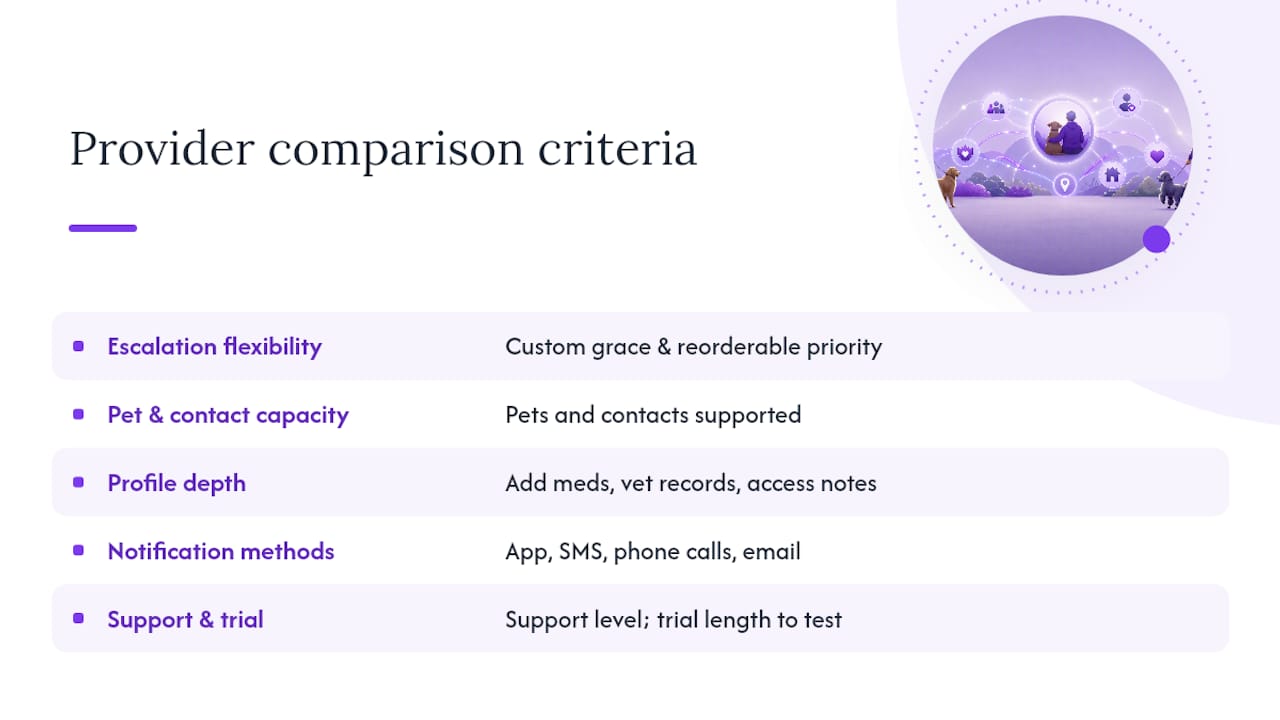
Notification method matters as much as any feature list. A service limited to app notifications alone won’t reach a contact who doesn’t check their phone often, while SMS, phone calls, and email combined give you more paths to a real response. Finally, weigh the support structure and trial length against your comfort level with the technology, since a longer trial period gives you more room to test real-world reliability before committing to a subscription.
Why Automation and a Prepared Care Circle Work Better Together
Automation alone doesn’t protect your pet. Neither does a list of phone numbers taped to your fridge. Together, they close a gap that either one leaves wide open on its own.
Mypetssafetynet was built around this exact problem: what happens to a pet when the person who feeds and cares for them can’t respond, and no one else knows to check. An automated daily check-in cuts the time between “something is wrong” and “someone knows” from hours or days down to minutes, because it doesn’t depend on a neighbor happening to notice.
But automation only shortens the gap. It doesn’t close it entirely. The system still hands off to a human being who has to answer the phone, drive over, and know what to do once they arrive. That’s why the software and the care circle aren’t separate projects. They’re one system, and each half makes the other one work.
— MyPetsSafetyNet
Getting Started With MyPetsSafetyNet
MyPetsSafetyNet was built to remove the guesswork from setup instead of leaving you to string together a spreadsheet, a spare key under a flowerpot, and hope. It maps directly onto the checklist covered above: scheduled check-ins by SMS, phone, or email, automatic escalation to your emergency contacts, a pet profile that stores medications and care instructions in one place, and a pet-care instruction card generator you can print or share digitally.

The service supports several pets and multiple emergency contacts per account, so multi-pet households and larger care circles aren’t stuck choosing between coverage and cost. Setup takes about the same time as filling out a detailed form: you enter your check-in schedule, add your contacts in priority order, and fill in your pet’s care details once. From there, the system runs quietly in the background until it’s needed.
If you’re a solo pet owner, an older adult living independently, or someone managing a disability who wants backup coverage without relying on luck, this is exactly the gap MyPetsSafetyNet was designed to close. Start with a free pet care card to see how the profile and instructions come together, then explore the full subscription setup when you’re ready to add automated check-ins and contact escalation to the mix.
Sources
- Pet Owner Safety | Daily Check-Ins Protect Your Dog/Cat | Free Trial
- How imalive Works — Step by Step Guide | I’m Alive
- PetHub QR Pet ID Wallet & Keychain Card – Emergency Backup for Your Pet