In 10 Minutes Start a Pet Care Countdown Timer for Solo Pet Owners
Set an automated pet care countdown timer today and add two to four trusted caregivers to your account. This kind of timer schedules regular check-ins with you and, if you miss one, alerts the people you name with your pet’s feeding, medication, and vet details. The single fastest step you can take in the next ten minutes is picking your check-in interval and entering your caregivers’ phone numbers so MyPetsSafetyNet can start protecting your pets today.
TL;DR:
- Shorter escalation windows of 5 to 30 minutes are crucial for high-risk situations, while healthy owners with nearby caregivers can set longer intervals of 4 to 6 hours.
- Using SMS or phone calls over app-based systems makes setup and ongoing use accessible to older adults, people without smartphones, or those preferring simplicity.
- Caregivers need a clear, concise pet care card with feeding, medication, vet contacts, and access info, stored both physically and digitally for quick reference.
- Regular review and adjustment of check-in intervals and caregiver contact details every few months help maintain effective emergency response.
- Automated check-ins support a broader pet emergency plan that includes supplies, identification, evacuation routes, and updated records for comprehensive preparedness.
Table of Contents
- What Is a Pet Care Countdown Timer, and How Does the Check-In Process Work?
- Why Solo Pet Owners Need This Layer of Protection
- How Do You Set Up a Pet Care Countdown Timer?
- How Do You Choose the Right Check-In and Escalation Intervals?
- What Should Go in Your Caregiver Instructions Template?
- How Does This Fit Into a Broader Pet Emergency Plan?
- When a Missed Check-In Actually Mattered
- Get Your Pet Care Countdown Timer Running Today
- Sources
- FAQ
What Is a Pet Care Countdown Timer, and How Does the Check-In Process Work?
A pet care countdown timer runs a simple loop: it checks on you, waits for a response, and escalates to your caregivers only if you go quiet. You set a schedule (daily, twice daily, or tied to a specific activity), and the system sends a reminder through SMS, a phone call, or email when your window opens.
If you respond, the countdown resets and nothing else happens. If you don’t, the system retries, then moves to the next step: alerting the emergency contacts you’ve named, in the order you set. This is why phone-free access matters so much for older adults or anyone without a smartphone. Systems that work over plain SMS or a phone call, without requiring an app, are far more accessible for people who don’t want to manage another download. Your caregivers don’t get a vague “check on them” message. They get the specifics they need to actually help your pet:
- Feeding schedule and portion sizes
- Medication names, doses, and timing
- Vet contact information and clinic address
- Where keys, food, and supplies are kept
Escalation timing scales with risk. A healthy owner checking in daily might allow several hours before an alert fires. Someone recovering from surgery or managing a chronic condition might set escalation windows as short as 5 to 30 minutes, according to MyPetsSafetyNet’s own service description. Shorter windows mean faster help, but they also mean tighter tolerances, so pick a setting that suits your daily rhythm.
Why Solo Pet Owners Need This Layer of Protection
A missed check-in shouldn’t take days to notice. Yet that’s exactly the risk solo pet owners carry: no one else in the house to notice you’ve gone quiet, no automatic trigger that gets someone to your door. An automated countdown compresses that gap from days to hours by putting a named person on alert the moment something looks wrong.
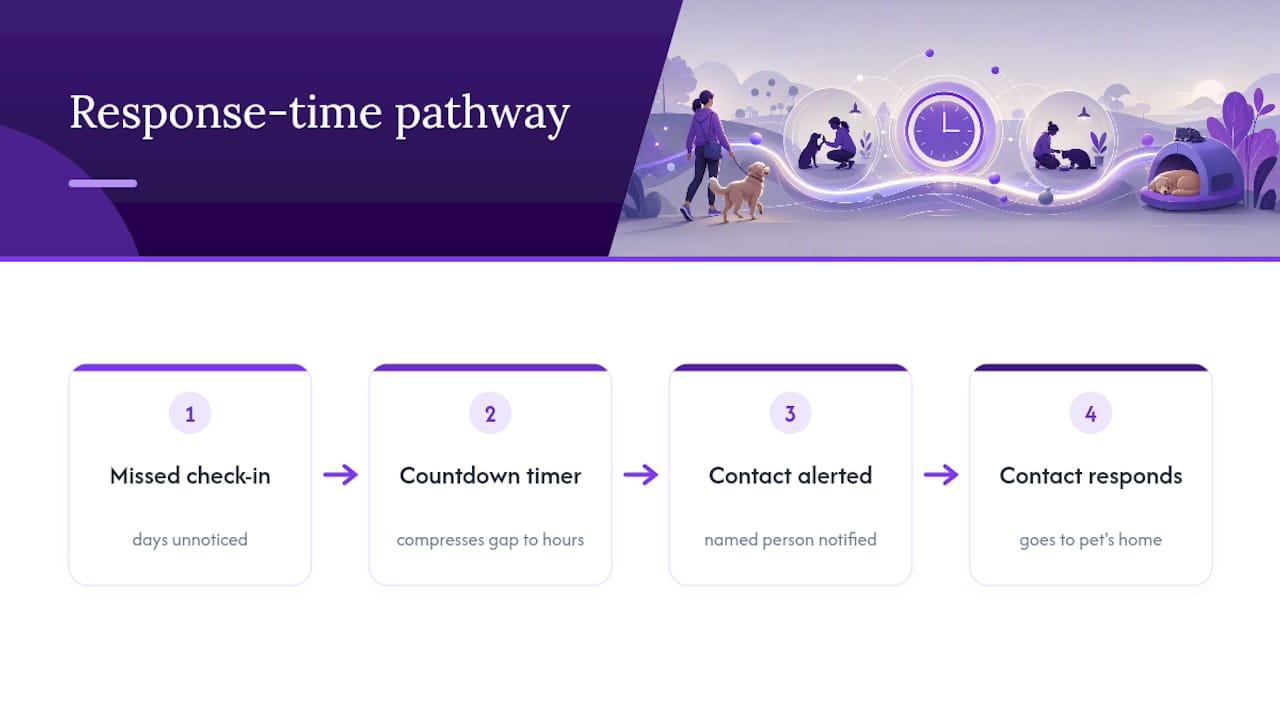
This matters most for people managing it alone, whether by choice or circumstance. Elderly pet owners, people with disabilities, and anyone recovering from a procedure face a sharper version of the same problem: a fall, a medical event, or a hospital admission can leave a pet unattended with no one aware. Preparedness guidance from Ready and the ASPCA both treat pets as part of the family emergency plan, not an afterthought, and both recommend pairing any automated system with real-world backups like local contacts and physical supplies.
Automated check-ins work best as one layer in a plan, not the whole plan. They shorten response time; they don’t replace a caregiver willing to actually show up.
How Do You Set Up a Pet Care Countdown Timer?
Getting protected doesn’t take long. Most of the setup is information you already know. Here’s the order that works:
- Pick your check-in cadence. Daily works for most people; twice-daily suits higher-risk situations.
- Name 2 to 4 caregivers with phone numbers, email addresses, and their relationship to you (neighbor, sibling, adult child).
- Build your pet care card: feeding routine, medications, vet contact, and where keys and supplies are stored.
- Gather your documents and a two-week supply of food, water, and medication, as the CDC recommends for any pet emergency kit.
- Run a live test alert and confirm each caregiver knows what to do when they get it.
Before you finalize your contact list, read through how many emergency contacts solo pet owners should name so you’re not relying on a single person who might not answer.
Pro Tip: Send your caregivers a short heads-up text the same week you set up the timer. A test alert that arrives out of nowhere gets ignored; one they’re expecting gets acted on.
How Do You Choose the Right Check-In and Escalation Intervals?
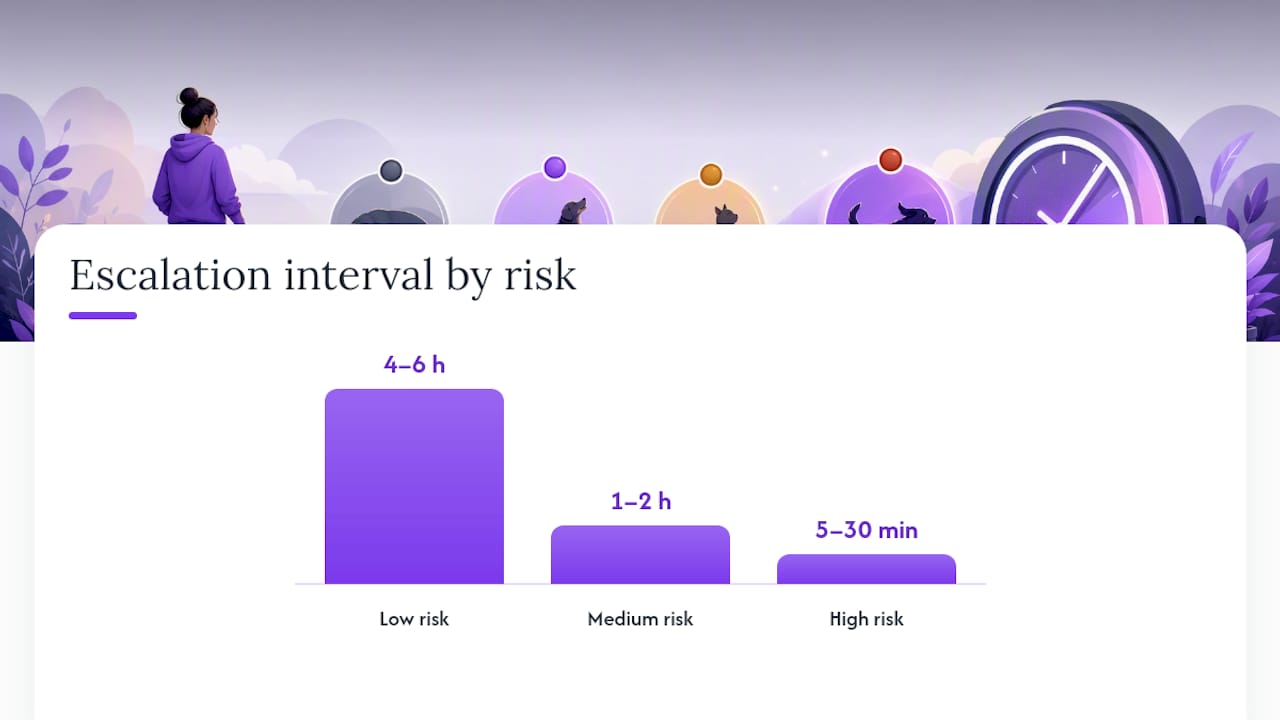
The right interval depends on your health, your pet’s needs, and how far your caregivers live from you. There’s no single correct number, but there are sensible bands to start from:
-
Low risk: healthy owner, healthy pet, caregiver nearby: daily check-in, escalation after 4 to 6 hours.
-
Medium risk: owner with a chronic condition or a pet on regular medication: twice-daily check-in, escalation within 1 to 2 hours.
-
High risk: recent surgery, acute illness, or a pet with a critical medication schedule: escalation as short as 5 to 30 minutes.
Several factors should push your settings tighter or looser: how mobile you are, whether your pet needs medication at fixed times, and how quickly your nearest caregiver can physically get to your home. Anyone traveling, recovering from a procedure, or dealing with a temporary health flare should switch to shorter, activity-based check-ins for that window and then dial back once things stabilize.
Don’t set it and forget it. After the first two weeks, review whether your alerts felt useful or just noisy, then adjust.
What Should Go in Your Caregiver Instructions Template?
Your caregivers need one document that answers every question they’ll have in the first five minutes on scene. Keep it short, specific, and easy to scan under stress. A complete pet care emergency document checklist covers the full version, but at minimum, include:
- Pet’s name, species, breed, and any distinguishing markings
- Feeding schedule with exact portions and times
- Medications: name, dose, frequency, and what happens if a dose is missed
- Vet name, clinic phone number, and a poison-control contact
- Access instructions: where the key is, alarm codes, gate latches
- Temperament notes: “friendly with strangers” versus “bites when scared”
List emergency priorities in the order a caregiver should check them, water and safety first, food second, so no one wastes time guessing. Store a printed card on the fridge, keep a digital copy your caregivers can pull up instantly, and update both whenever a medication or schedule changes. Share access only with people who genuinely need it, and review that list every few months. A partner resource like PetGev’s ambassador program offers useful context on building caregiving materials that a trusted person can act on without guesswork.
How Does This Fit Into a Broader Pet Emergency Plan?
A countdown timer accelerates the alert. It doesn’t evacuate your pet, call 911, or replace the physical items you’d need in an actual disaster. Think of it as the trigger, not the whole response. Round out your plan with:
- A two-week supply of food, water, and medication, plus current veterinary records, per CDC guidance
- Updated microchip registration and a recent photo, as the ASPCA recommends
- An evacuation plan that names where you and your pet would go
- A full emergency pet care plan that ties supplies, records, and contacts together in one place
Set a quarterly reminder to check contact numbers, refresh supplies, and confirm your caregivers still live nearby and still know the plan. Emergency preparation decays quietly if nobody revisits it.
When a Missed Check-In Actually Mattered
Picture an owner living alone with two cats, recovering from a minor procedure that made mornings unpredictable. Her check-in was set for 9 a.m. with a 30-minute escalation window. One morning she didn’t respond, not because of an emergency but because she’d overslept from medication. Her named caregiver got the alert, called her, and when she didn’t pick up, drove over. She was fine. But the cats hadn’t been fed, and the caregiver had her pet care card in hand, so there was no confusion about dosage or diet once she opened the door.
That’s the outcome this system is built for: not drama, just a fast, informed response before a small gap becomes a real problem.
— MyPetsSafetyNet
Get Your Pet Care Countdown Timer Running Today
MyPetsSafetyNet is built specifically for pet owners who live alone, whether by circumstance, age, or health, and need caregivers notified with real instructions, not just a generic alert. Unlike general safety apps, MyPetsSafetyNet gives your named contacts the exact pet care card they need: feeding schedule, medications, vet contact, and where to find your keys and supplies. No smartphone required. It works over SMS or phone calls, so setup takes less than 10 minutes.

Start with the free pet care card to see how the caregiver instructions come together, then check the Monthly plan at $6.99 per month, which includes a 7-day free trial with no credit card required. Add your caregivers, run a test alert, and confirm they know exactly what to do the first time it matters.
Sources
FAQ
What Is a Pet Care Countdown Timer?
It’s an automated wellness-check system that schedules regular check-ins with you and notifies your named caregivers, with your pet’s care details, if you fail to respond. It’s built to shorten the gap between an emergency and someone actually checking on your pet.
How Often Should I Check In?
Most owners do well with a daily check-in and an escalation window of a few hours, though people managing chronic conditions or pets on strict medication schedules often shorten that to 5 to 30 minutes, per MyPetsSafetyNet. Adjust after your first two weeks based on what feels responsive rather than noisy.
Do I Need a Smartphone to Use This?
No. Systems built for accessibility, including MyPetsSafetyNet, work over standard SMS text messages or phone calls, so anyone with a basic phone can participate.
What Should I Include on a Caregiver’s Pet Care Card?
Include feeding schedule and portions, medication name and dosage, vet and poison-control contacts, access instructions for your home, and any temperament notes a caregiver would need on arrival.
How Much Does MyPetsSafetyNet Cost?
The Monthly plan is $6.99 per month and includes a 7-day free trial with no credit card required.