5–30 Minute Caregiver Escalation Timings for Solo Pet Owners
Set a five-minute retry, a ten-minute second retry, a thirty-minute call to your closest local helper, and only then a step toward emergency services. That single sequence, run through an automated wellness check-in service, covers most solo pet owners. The four things to protect at every rung are speed, redundant contact channels, a confirm gate before anyone dials 911, and a testing habit that catches weak links before a real emergency does.
TL;DR:
- Set shorter timeouts for initial retries and contacts based on your household’s risk level, with faster escalation for high-risk or pet-related emergencies.
- Prioritize local contacts who answer promptly over closer but slower responders, listing contacts by response speed rather than relationship closeness.
- Ensure each contact has at least two independent communication channels, such as voice and text, to prevent missed alerts from technical failures.
- Regularly test the escalation ladder monthly with quick checks and conduct full drills quarterly to confirm response times and update contact information.
- Use an automated wellness check service to manage timing, contact order, retries, and logging, reducing the risk of manual setup errors.
Table of Contents
- What Are Caregiver Escalation Timings and Why Do the Timeouts Matter?
- How Do You Set the Right Intervals for Each Risk Level?
- Who Should Be on Your Emergency Contact List?
- Do You Need Backup Alert Channels Beyond Your Escalation List?
- How Often Should You Test Your Escalation Ladder?
- What Do Ready-to-Copy Timing Templates Look Like?
- How MyPetsSafetyNet Approaches Escalation Timing
- Ready to Set Up Your Own Escalation Timings?
- Where This Guide’s Guidance Comes From
- Sources
What Are Caregiver Escalation Timings and Why Do the Timeouts Matter?
Caregiver escalation timings are the countdown intervals your wellness check service uses to decide when to move from “no response yet” to “notify the next contact.” Think of it as a ladder. Each rung has a name attached to it, and each rung gets a fixed amount of time before the system climbs to the next one.
The ladder generally runs like this:
- Rung 1: an automated retry of the check in itself (a second text or call)
- Rung 2: a nearby helper who can physically knock on your door, like a neighbor or building manager
- Rung 3: a named emergency contact, usually family or a close friend
- Rung 4: a designated caregiver or professional aide who can take the pets
- Rung 5: emergency services, used only when no human contact confirms your status
Every rung needs an explicit timeout and an onward step for when that rung fails to respond. Without both pieces, the whole ladder stalls on one missed call. Practitioners who build these systems for other high-stakes settings put it plainly: assume the first attempt will fail, and design short timeouts so the workflow keeps moving instead of freezing on a single unanswered rung.
Here’s the part solo, elderly, or disabled pet owners often get backward: seniority should not decide who gets called first. The person you trust most with big decisions is not automatically the person who lives closest or answers their phone fastest. Immediacy wins at the bottom of the ladder. Save the most senior decision maker for a later rung, where judgment matters more than speed.
Pro Tip: List your contacts by response speed, not by relationship closeness. A neighbor who answers texts in two minutes beats a sibling three states away who checks their phone once a day.
How Do You Set the Right Intervals for Each Risk Level?
Interval choices depend on how much risk you’re managing and what time of day it is. A healthy 28-year-old living alone with one cat has different needs than an 80-year-old managing diabetes with two dogs.
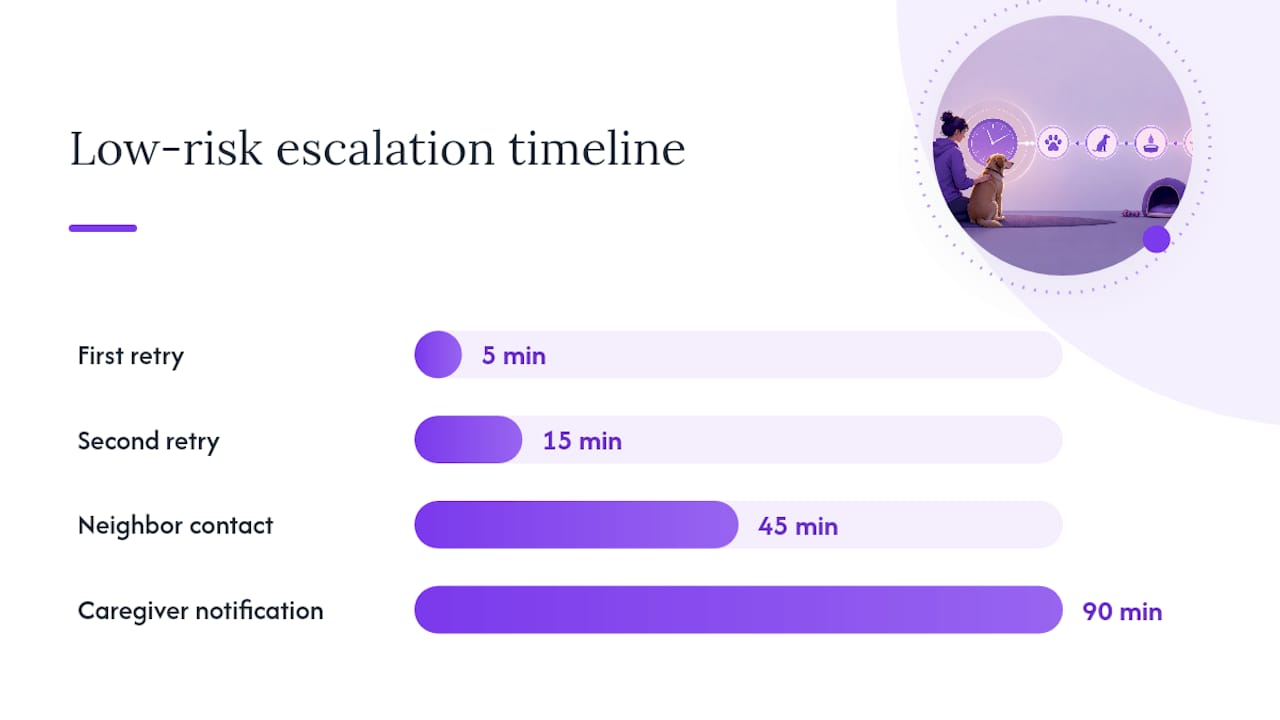
- Low risk (independent adult, no major health conditions): first retry at 5 minutes, second retry at 15 minutes, neighbor contact at 45 minutes, caregiver notification at 90 minutes.
- Medium risk (some mobility limits, lives alone, minor chronic conditions): initial retries and contacts escalate more quickly than low risk, with steps spaced to balance urgency and practicality.
- High risk (serious medical condition, recent fall history, or advanced age): rapid initial retries and contacts with short intervals, and a mandatory human confirmation before involving emergency services.
Overnight hours call for longer windows on the earliest retries, since a missed check in at 3 a.m. is more often a sleeping owner than a crisis. Weekends deserve the same logic. Automated check-in platforms commonly build in two to three retries spread across 15 to 30 minutes before looping in a care group, which lines up well with the medium-risk profile above.
The confirm gate matters more than any single timing number. Before your system escalates to actual emergency services, a real person, either you confirming you’re fine or a named contact confirming they’ve checked on you, should approve that step. Automatic 911 dispatch without human confirmation belongs only in high-risk profiles where you’ve explicitly opted into that setting.
Who Should Be on Your Emergency Contact List?
Two to four contacts cover almost every solo household without making the ladder too complicated to manage. More than four contacts usually means confusion about who’s supposed to act, not better coverage.
A workable mix looks like this:
- One immediate local contact — a neighbor, doorman, or building manager who can physically check your door within minutes
- One nearby family member or close friend — someone who lives close enough to arrive within the hour
- One designated caregiver or home aide — the person equipped to actually handle your pets, not just check on you
- One optional professional contact — a veterinarian’s office or pet sitter who knows your animals already
Assign roles clearly. One person performs the physical wellness check. One person coordinates ongoing pet care if you’re hospitalized. One person makes the call to emergency services if it comes to that. Overlap is fine; ambiguity is not.
Write down care instructions, feeding schedules, medication needs, and key locations somewhere your contacts can find fast. A pet caretaker agreement that spells out expectations in advance removes guesswork exactly when guesswork is most dangerous, and pairing it with a documented care plan gives your caregiver everything they need without a single phone call to you.
Do You Need Backup Alert Channels Beyond Your Escalation List?
Yes, and this is where a lot of setups quietly fail. Each contact on your list needs at least two independent ways to be reached, not just one. Voice call plus text message. Text plus a knock on the door from a neighbor. If your only channel to a contact is a phone that’s on silent, a dead battery or a bad signal takes down your whole plan.
Public alert systems can supplement this, but they were never built to replace it. Wireless Emergency Alerts push geographically targeted warnings to compatible phones, but delivery depends on carrier participation and device capability, and local agencies decide when to send them, not you. IPAWS works similarly, letting local authorities target broad areas rather than individual households. Neither system knows your pet needs medication at 6 p.m.
Three things worth checking today:
- Confirm your phone is WEA-capable in its settings menu.
- Sign up for your local opt-in alert list, including Reverse 911 if your area offers it.
- Update your contact channel preferences in your wellness check account so voice and text are both active.
How Often Should You Test Your Escalation Ladder?
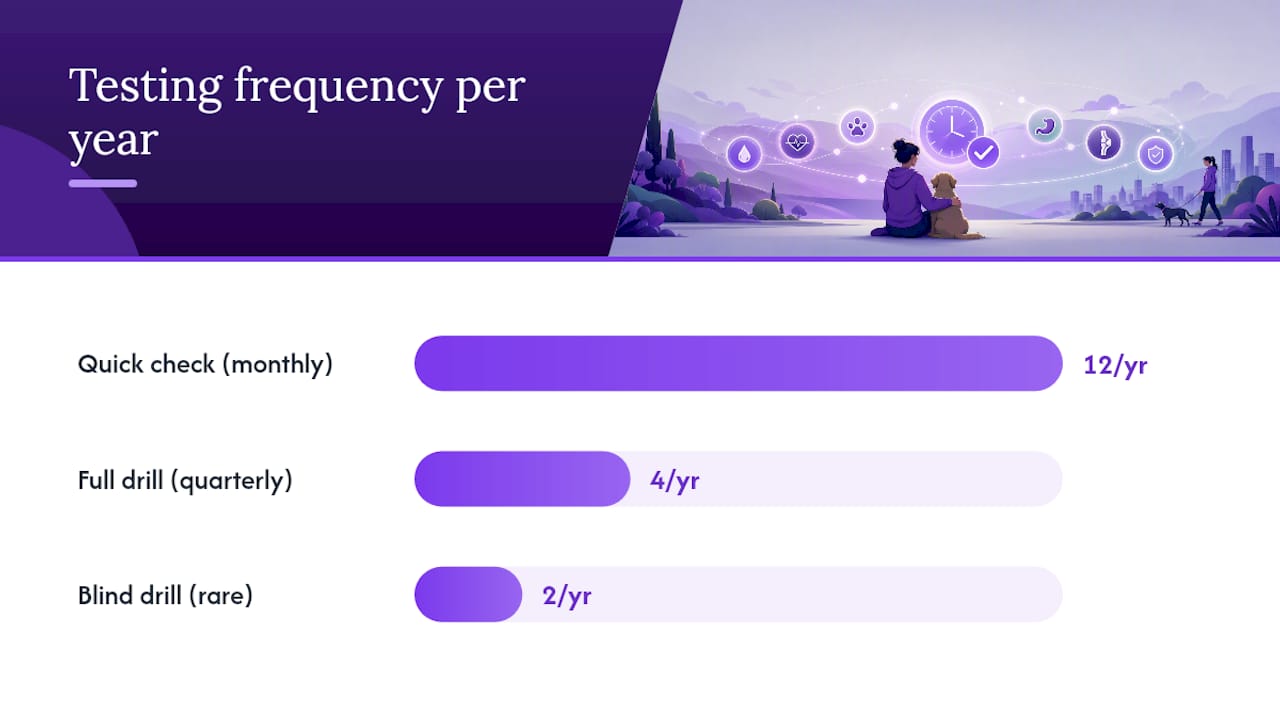
Test monthly with a quick check and quarterly with a full drill. A quick check just confirms your automated messages are reaching your phone. A full drill walks the whole ladder, contacting your actual named people to see if the system reaches them and if they know what to do.
- Run a soft drill first: tell your contacts in advance that a test message is coming, so nobody panics.
- After a few clean runs, try a blind drill without warning, which shows you how people react under real uncertainty.
- Log every result: who responded, how long it took, and any dead ends in the chain.
- Fix failures immediately. A contact who didn’t see the text needs a channel change, not a mental note.
Testing is the only honest way to know your ladder works, since assumptions about response speed rarely match reality until you run the actual drill.
Pro Tip: Keep blind drills rare, maybe twice a year. Frequent surprise tests wear out your contacts’ patience faster than they improve your data.
What Do Ready-to-Copy Timing Templates Look Like?
These three templates give you a starting point. Adjust the minutes to fit your own health situation and household.
- Template A, low risk: retry at 5 minutes, second retry at 15 minutes, neighbor contact at 45 minutes, caregiver contact at 90 minutes.
- Template B, medium risk: retry at 3 minutes, neighbor contact at 20 minutes, caregiver contact at 40 minutes, confirm gate before any further step.
- Template C, high risk: retry at 2 minutes, on-site contact at 10 minutes, caregiver contact at 20 minutes, confirmed human approval required before emergency dispatch.
Multi-pet households and pets with medical needs should shift toward Template C even if the owner’s own health risk is low. Two dogs needing insulin on a schedule can’t wait through a 90-minute window the way a single low-maintenance cat can. Build your timing choice around your pets’ needs, not just your own.
How MyPetsSafetyNet Approaches Escalation Timing
We built our check-in workflow around one belief: solo, elderly, and disabled pet owners deserve a system that moves fast without moving carelessly. Our escalation settings support the retry counts and windows described throughout this guide, and our pet care documentation guide walks you through exactly what your named caregiver needs on hand.
— MyPetsSafetyNet
Ready to Set Up Your Own Escalation Timings?
Configuring these timings yourself, by hand, across multiple apps and sticky notes, is exactly the kind of thing that falls apart the one week you need it most. An automated wellness check-in service handles the countdown logic, contact ordering, and retry attempts automatically, so your pets get help based on the timing rules you set once and never have to remember again.

The service lets you configure retries, manage up to three emergency contacts and five pets, and generate a printable care instruction card your caregiver can grab in seconds. Every check-in and escalation attempt gets logged, so you have a clear record of what happened and when. If you want to see how the timing settings work before committing to anything, start with the free pet card to build your pet’s care profile now, then set up your full account at Mypetssafetynet when you’re ready to activate automated check-ins. Our support team can help you fine-tune your intervals based on your own health situation and your pets’ needs.
Where This Guide’s Guidance Comes From
The timing and testing recommendations above draw on the FCC’s consumer guide to Wireless Emergency Alerts, FEMA’s IPAWS overview, and Ready.gov’s guidance on personal alert systems. Testing cadence follows peer-reviewed guidance on verifying escalation systems, and the ladder structure itself borrows from practitioner escalation playbook design. For broader pet safety preparation, Bug Away’s pet safety resources offer supplemental products worth reviewing alongside your emergency plan.
Sources
- Wireless Emergency Alerts (FCC consumer guide)
- IPAWS 101 (FEMA slicksheet)
- Ready
- Peer-reviewed guidance on testing escalation systems
- Building an escalation ladder that actually gets answered (Not A Lone Worker)