Daily Check Ins: Phone Tree Setup for Solo Pet Owners
An emergency phone tree setup for pet owners is an automated wellness check combined with a contact notification workflow: you get a daily prompt to confirm you’re okay, and if you miss it, your pet’s care details go straight to people who can step in. The first move is simple. Turn on a daily automated check-in today. Mypetssafetynet builds this exact workflow, and it starts with something as basic as a scheduled text you tap to confirm you’re fine.
TL;DR:
- A detailed pet emergency profile should include identification, medical information, routine, vet details, home access, and supplies to ensure proper care during emergencies.
- Select emergency contacts based on physical proximity and access, prioritizing neighbors or nearby caregivers who can respond quickly, and confirm their consent explicitly.
- A daily check-in system with multiple contact channels and a clear escalation workflow helps ensure prompt response and avoids delays if a pet owner is unreachable.
- Regular testing and updating of the system, including physical backups and profile reviews, are essential to maintain effective emergency preparedness.
- Integrating owner and pet alerts into one system reduces confusion and speeds response by ensuring both safety concerns and pet care instructions reach the same contact without ambiguity.
Table of Contents
- How Do You Build a Pet Emergency Profile for Your Phone Tree?
- Who Should You Name as an Emergency Contact?
- What Check-In Cadence and Alert Channels Work Best?
- How Do You Set Up an Escalation Workflow?
- How Do You Test and Maintain the System?
- Why Integrated Owner and Pet Check-Ins Work Better
- Get Your Full Phone Tree Running With Mypetssafetynet
- Quick Resources and Printable Templates
- Sources
How Do You Build a Pet Emergency Profile for Your Phone Tree?
Before you set cadence or contacts, you need a profile detailed enough that a stranger could walk in and care for your pet correctly on the first try. Roughly 85% of pet owners say they worry about their pet’s safety in an emergency, according to an ASPCA survey, and that concern is exactly why a thin profile fails when it matters most. A caregiver arriving cold needs specifics, not vague notes.
Build your profile around these fields:
- Identity: pet’s name, species, breed, a current photo, and where they usually hang out in the house.
- Medical: diagnoses, medications with exact dosages and times, allergies, and any behavior quirks (fear of strangers, resource guarding, hiding when scared).
- Daily routine: feeding schedule, treats or foods to avoid, where the leash and carrier live, and any calming cues that help an anxious pet.
- Vet and microchip: clinic name and phone number, plus the microchip number and registry company on file.
- Home access: spare key location, smart lock codes, alarm disarm steps, and parking or entry notes for someone unfamiliar with your building.
- Supplies: exact locations for food, medication, litter, carrier, and any specialized equipment like a harness or ramp.
Write this once, store it digitally, and it becomes the packet your emergency contacts automatically receive the moment a check-in is missed.
Who Should You Name as an Emergency Contact?
Pick people who can actually get to your home, not just people who love your pet. Proximity and access matter more than emotional closeness when minutes count.
- Name a primary and at least one backup caregiver. Both need to agree in advance and understand exactly what’s expected of them, a step guidance from the University of Arizona treats as essential rather than optional.
- Favor a nearby neighbor over a distant relative. Someone fifteen minutes away with a spare key beats a sibling three states away every time. Physical access outweighs a “guardian” title.
- Confirm consent with a short, direct ask. Try: “If I don’t respond to a check-in within a few hours, can I list you to get an alert with my pet’s care details and a way into my home?” Get a clear yes, not a maybe.
- Record professional backups too. If you use a mobile vet or boarding facility, log their contact info and intake policy in case both personal contacts are unreachable.
What Check-In Cadence and Alert Channels Work Best?
A daily check-in is the right default for almost everyone. It shrinks the gap between something going wrong and someone finding out from days down to hours, which is the entire point of the system.
Match cadence to your pet’s needs:
- Standard: daily check-in with a 4 to 8 hour grace period before alerts fire, depending on your routine.
- High-need pets: twice-daily check-ins for animals on strict medication schedules.
- Weekend gaps: avoid skipping check-ins on weekends. That’s often when routines slip and detection delays start.
Channel choice matters just as much as timing. An automated phone call works better than a text for owners who are less comfortable with apps or who have vision limitations. SMS is fast for tech-savvy contacts. Email works as a backup layer but shouldn’t be your only channel, since it’s the easiest one to miss.
Pro Tip: List two channels per contact, like a call plus a text, so a dead phone battery or a missed ring doesn’t break the whole chain.
How Do You Set Up an Escalation Workflow?
Your escalation sequence decides who gets alerted, in what order, and what each message says. This is the backbone of the entire plan.
- First missed check-in: an automated call or text goes to you directly, giving you one more chance to respond before anyone else is notified.
- No response after the grace period: your primary contact gets an alert with the full pet profile, your home access details, and the request to check on you and your pet.
- Still no response: your backup contact and, if listed, a professional caregiver receive the same information with an urgency flag.
- Message content: every alert should state the action needed, the pet’s priority needs (meds first, feeding second), exact entry instructions, and vet and microchip details.
Customize wording for mobility-limited owners by adding a line like “I may not be able to answer the door” so contacts know to use the key or code without hesitating.
How Do You Test and Maintain the System?
A phone tree that’s never been tested is just a hope, not a plan. Run a full simulated missed check-in with your primary contact and confirm they can actually get into your home and follow the care instructions.
- Monthly: a quick simulation to confirm alerts fire and contacts respond.
- Quarterly: full review of medications, vet contact info, and microchip registry accuracy.
- After any change: update the profile immediately if you switch vets, adjust a dosage, or a caregiver moves away.
Physical backups matter too. Keep a pet alert card in your wallet, a printed info sheet on the fridge, and a small sticker near your entry door noting a pet is inside. The CDC’s preparedness guidance treats these low-tech touches as just as important as any app.
Pro Tip: Store a copy of your pet profile in the cloud and a printed copy in a labeled folder by the door, so it works even if your phone doesn’t.

Why Integrated Owner and Pet Check-Ins Work Better
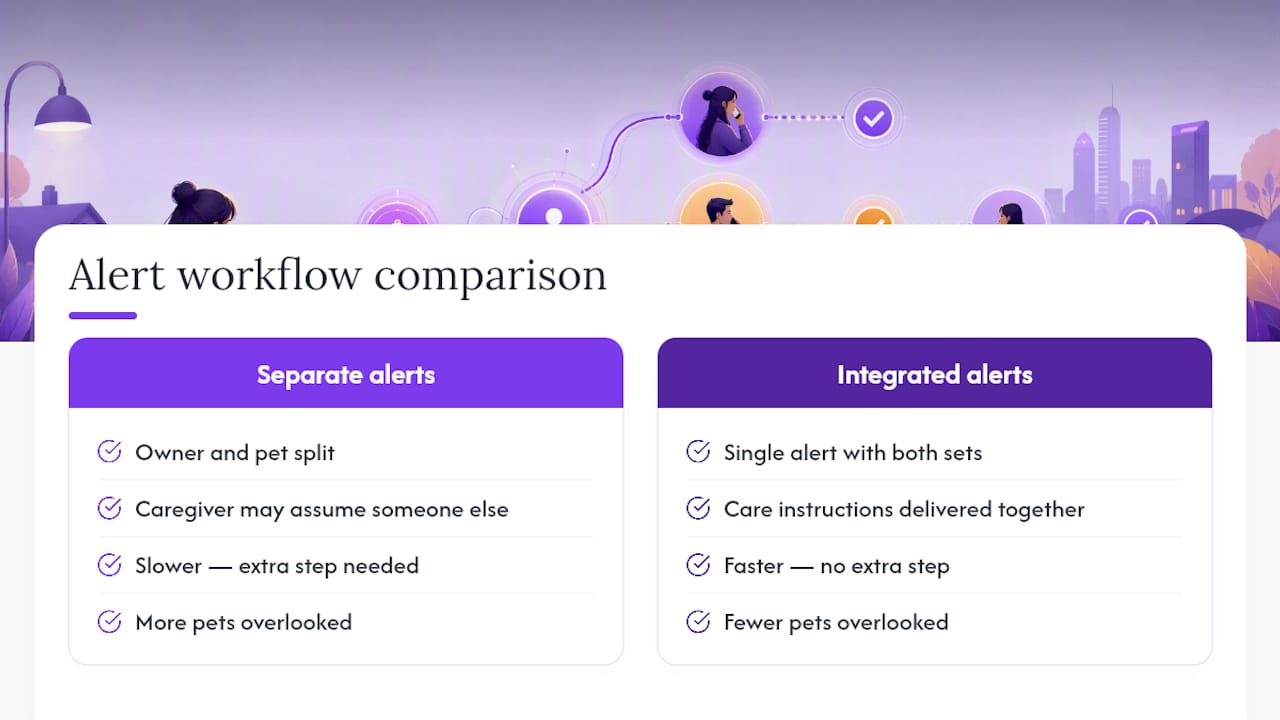
Most emergency plans treat the owner’s safety and the pet’s safety as two separate problems. That’s the flaw. A caregiver who gets an alert about you personally will often assume someone else is handling the pet, and nobody ends up going.
An integrated workflow closes that gap by design. When a check-in is missed, the same alert that flags a wellness concern also delivers the pet’s care instructions, so there’s no ambiguity about who’s responsible for feeding, meds, or a trip to the vet. Response time depends entirely on how fast that information reaches someone who can act, and combining the two alerts into one removes a step that too many plans leave to chance. Fewer pets get overlooked because nobody has to guess.
— Mypetssafetynet
Get Your Full Phone Tree Running With Mypetssafetynet
Building all of this by hand with spreadsheets and group texts works until you forget to update one contact’s number. Mypetssafetynet replaces that patchwork with one system: automated daily check-ins by call, text, or email, a built-in escalation workflow, and a pet-care instruction card generator that delivers your full profile to contacts automatically the moment you miss a check-in.

It’s built for solo pet owners, and especially for elderly or disabled pet owners who want a plan that runs itself without constant upkeep. You can manage up to five pets and three emergency contacts, and set your own countdown intervals to match your routine. Start with a free pet alert card to get your profile in writing today, then move into a free trial to turn it into an automated system. Details on how alerts are sent by phone, SMS, and email are outlined on the notification consent page.
Quick Resources and Printable Templates
For a deeper look at choosing caregivers, read Mypetssafetynet’s guide to backup caregiver plans. Pair it with paste-ready feeding schedule blocks for your profile, and a compact first-aid reference for immediate emergencies.
Sources
- ASPCA press release / survey
- Older People and Pets (University of Arizona / guidance document)
- CDC — Healthy Pets, Healthy People: Emergency preparedness
- Triage Health — Planning ahead for your pets (quick guide)