Wellness Check-In Service for Solo Pet Owners
If you live alone with pets, the right wellness check-in service is Mypetssafetynet — a pet-first platform built around Care Circle notifications and missed-check-in escalation. Your immediate next step: add at least two verified emergency contacts to your Care Circle and schedule your first daily check-in today. If a check-in is ever missed and contacts can’t reach you, they’ll know to act for your pets before calling 911.
Table of Contents
- How does a wellness check-in service work?
- How to set up your account specifically for your pets
- What happens after a missed check-in?
- Privacy, reliability, and what these services don’t do
- How to choose the right wellness check-in service
- Mypetssafetynet is built for solo pet owners like you
- Key Takeaways
- Why peace of mind for your pets starts with one simple step
- Useful resources to help you get started
How does a wellness check-in service work?
The daily flow is simple. At your chosen time, the service sends an automated text or voice call. You reply “OK” or press a key to confirm you’re fine. That’s it — the system stops and logs the response.
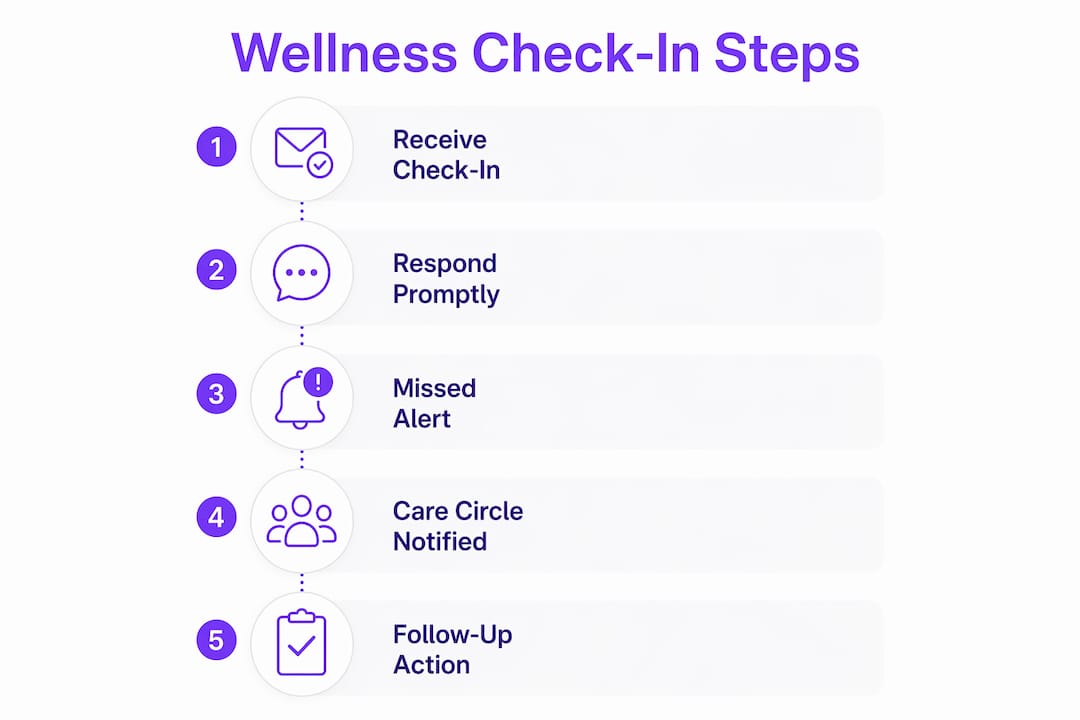
No reply triggers a multi-step escalation:
- Scheduled check-in sent — SMS or automated voice call arrives at your set time
- No response — a reminder or retry goes out within your chosen window (typically 30 minutes to a few hours)
- Still no response — an automated phone call attempts contact
- Call unanswered — your Care Circle receives an alert by text and call
- Contacts can’t reach you — they take in-person action and escalate to 911 if needed
Every message sent, every reply received, and every call made is logged with a timestamp, giving you a full audit trail if you ever need to review what happened and when.
A key advantage over pendant-based alert devices: no wearable is required. The check-in arrives on your regular phone, so an incident that leaves you unable to reach a button is still captured by a missed response.

Pro Tip: Set your check-in window to match your daily routine — morning if you feed pets at 7 AM, evening if you work late. Enable both SMS and voice fallback so a carrier delivery failure on one channel doesn’t silence the alert.
How to set up your account specifically for your pets
A solid setup takes about five minutes and requires three things: your contact information, at least two emergency contacts who have agreed to act, and a short pet care plan.
Your pet care instructions are the most important thing you’ll fill out. A contact who arrives at your home needs to know what to feed, what to give, and where to find the vet records — without having to guess.
Essential account setup checklist:
- Your name, phone number, and address
- Two or more emergency contacts (name, cell number, confirmed willingness to act)
- Primary vet name, clinic phone, and after-hours number (your local veterinary clinic can provide this)
- Home access instructions — where the spare key is stored or who has a copy
- Feeding schedule: times, amounts, and food type per pet
- Medication list: drug name, dose, and administration time
- Pet temperament notes (anxious around strangers, needs leash before door opens, etc.)
- Where to find vaccination records and the pet’s microchip number
A short pet instruction template to copy into your account:
- Feeding: [Pet name] eats [amount] of [food brand] at 7 AM and 5 PM.
- Medication: [Drug name], [dose], given with food at 8 AM.
- Litter/house routine: Litter box is in the hall closet; walk at 6 PM.
- Calming cue: Responds to “settle” and a slow scratch behind the ears.
- Key location: Spare key is in a lockbox at the front door; code is [XXXX].
- Vet records: Folder on the kitchen counter labeled “Pet Emergency.”
For travel or planned hospital stays, most services let you pause check-ins temporarily and restore them with one step. Use that feature rather than disabling your account entirely — your pet care instructions and contact list stay intact for when you return. A guide on planning for hospital stays walks through longer handoff scenarios in detail.
What happens after a missed check-in?
Missed check-ins follow a clear, multi-tiered escalation. Here’s a realistic example timeline if your check-in is set for 8:00 AM:
| Time | Action |
|---|---|
| 8:00 AM | Automated text check-in sent |
| 8:30 AM | Reminder sent (no reply received) |
| 9:00 AM | Automated voice call placed |
| 9:30 AM | Care Circle alerted by text and call |
| — | Contacts attempt in-person visit; escalate to 911 if needed |
The window from a missed check-in to a human response typically runs 1–6 hours, depending on your retry settings and how quickly contacts are reachable.
What your emergency contacts should do when notified:
- Call your cell phone immediately.
- If no answer, try a second number or a neighbor.
- Go to your home and attempt entry using the access instructions you provided.
- Check on you and your pets.
- If you’re unresponsive or the pets are in danger, call 911 and contact your vet.
- Follow the pet care instructions in your account until you’re able to resume care.
Dos and don’ts for Care Circle members:
- Do confirm your role before being listed as a contact.
- Do save the service’s alert number so you recognize the call.
- Don’t assume the service automatically dispatches 911 or animal control — that step requires a human decision.
- Don’t wait more than one hour after receiving an alert before attempting contact.
Privacy, reliability, and what these services don’t do
These are communication and social-wellness tools. They do not provide medical advice, monitor vital signs, or dispatch emergency services automatically. In any medical emergency, call 911 directly.
That distinction matters for how you set expectations with your Care Circle. The service alerts your contacts; your contacts take physical action. The system works because the humans in it are prepared.
Trust signals to verify before you sign up:
- Notification logs with timestamps (so you can confirm alerts were sent and received)
- Confirmed contact verification (the service should prompt contacts to acknowledge their role)
- SMS plus voice fallback (if a text fails due to a carrier issue, a call still goes out)
- A clear privacy statement explaining how long logs are kept and whether data is shared
Most wellness check-in services are not HIPAA-regulated because they don’t collect protected health information. That’s expected and fine for this use case — but read the privacy policy to confirm your data isn’t sold to third parties.
Pro Tip: Run a live test with your Care Circle before you rely on the service. Miss a check-in intentionally, let the escalation run, and confirm every contact received the alert. Record the timestamps so everyone knows what the real flow looks like.
How to choose the right wellness check-in service
The best provider for a solo pet owner supports Care Circles, reliable escalation, multiple contact methods, and a field for pet-specific instructions. Use this checklist when evaluating options:
- U.S. coverage — confirm SMS and voice delivery works on U.S. carriers
- SMS + voice fallback — both channels should be active, not one or the other
- Configurable retry windows — you should control how long the system waits before escalating
- Multi-contact escalation — at least two contacts should receive alerts, not just one
- Audit logs with timestamps — a complete history of sent messages and responses
- Pet instruction field — a place to store vet info, feeding schedule, and key location
- Pause and restore feature — for travel, vacations, or planned medical procedures
- Easy onboarding — setup should take minutes, not a lengthy intake process
Pricing questions to ask every provider:
- What is the monthly fee, and is there a free trial?
- Are SMS and voice alerts included, or billed separately?
- Can you cancel anytime without a penalty?
- Is there a per-contact charge for multiple Care Circle members?
During a free trial, run at least one live missed-check-in scenario. Confirm that every contact on your list receives the alert within the expected window. If the escalation doesn’t reach your full Care Circle in testing, it won’t in a real emergency either. A broader look at automated check-ins and pet safety covers additional evaluation criteria worth reviewing.
Mypetssafetynet is built for solo pet owners like you
Solo pet owners need more than a generic daily check-in. You need a service that stores your vet’s number, your spare key location, your pet’s medication schedule, and a Care Circle that knows exactly what to do when an alert fires.

Mypetssafetynet was built for exactly this situation. It includes pet-specific instruction fields, multi-contact Care Circle escalation, SMS and voice check-ins, and a full audit log so you can verify the system worked. Setup takes minutes: enter your information, add two verified emergency contacts, fill in your pet care instructions, and run a test check-in. If you’re ever incapacitated, your contacts are notified promptly and your pets won’t be left waiting. For a complete template on what to include in your emergency packet, the pet care emergency document guide is a practical starting point. Create your account at mypetssafetynet.com and run your first test check-in today.
Key Takeaways
A pet-focused wellness check-in service protects your pets by alerting a verified Care Circle when a check-in is missed, giving contacts clear instructions to act within 1–6 hours.
| Point | Details |
|---|---|
| Build your Care Circle first | Add at least two verified contacts who have agreed to act before your first check-in. |
| Fill out pet instructions completely | Include feeding times, medications, key location, and vet contact so responders can act immediately. |
| Understand the escalation timeline | From a missed check-in to a human response typically runs 1–6 hours depending on retry settings. |
| Test the system before you need it | Run a live missed-check-in scenario to confirm every Care Circle member receives the alert. |
| Mypetssafetynet | Designed for solo pet owners with pet instruction fields, Care Circle escalation, and SMS plus voice check-ins. |
Why peace of mind for your pets starts with one simple step
Imagine a Tuesday morning when you don’t reply to your 8 AM check-in. By 9:30 AM, your Care Circle has been alerted. Your neighbor, listed as your first contact, uses the spare key code you stored in your account, walks in, feeds your cat, and calls your sister. Your pets are safe before you’ve even been found. That’s the whole point of this kind of planning — not to prepare for the worst, but to make sure your pets are never the ones who pay for an unexpected moment.
The worry that most solo pet owners carry isn’t about themselves. It’s about the animals who depend entirely on them. A daily health check-in program removes that worry with a single text each morning. You reply, the system stops, and everyone is fine. You don’t reply, and the people who love you and your pets know exactly what to do.
Useful resources to help you get started
These resources give you the next layer of detail for each part of your setup:
- Mypetssafetynet — wellness check-in service — the main landing page to create your account, review features, and start your first check-in.
- Automated check-ins and pet safety — a deeper look at how automated check-ins work and why they outperform pendant-based systems for solo owners.
- Pet care emergency document guide — a template for building a one-page emergency packet with vet records, medications, and access details.
- Services that notify others if you can’t care for your pet — step-by-step advice for assembling a Care Circle and writing instructions for emergency responders.
- Animal Care of Hobe Sound — veterinary services — a reference for after-hours vet contacts and emergency drop-off procedures to include in your pet care instructions.