10 Minutes to a Testable Emergency Contact Order for Solo Pet Owners
An emergency contact order is an automated wellness check-in that escalates to named contacts with your pet’s care instructions when you don’t respond. It works for solo pet owners, older adults, and disabled pet parents who live alone and worry about what happens to their pets if help doesn’t arrive fast enough. Set up a pet profile, name two to four contacts, and run a test check-in today.
TL;DR:
- Using two to four contacts ensures there is always someone available to respond if the primary contact is unavailable or unable to act quickly.
- Regularly testing your emergency plan every three to six months, or after major changes, helps prevent outdated contact information from causing delays.
- Including detailed pet care instructions, identification, veterinary contacts, and supply locations enhances response speed and accuracy during emergencies.
- Assigning a single trusted person as the final decision-maker for veterinary care prevents delays caused by hesitation among multiple contacts.
- Automated check-in systems that escalate on non-response provide a reliable way to ensure prompt action without dependence on static plans or manual follow-up.
Table of Contents
- Building Your Emergency Contact Order: A Setup Checklist
- Who Should You List as an Emergency Contact?
- How Often Should You Test and Update Your Plan?
- Preparing an Accessible Pet Emergency Kit
- Who Can Authorize Emergency Veterinary Care for Your Pet?
- What Automation Actually Fixes That Static Plans Can’t
- Set Up Your Emergency Contact Order Today
- Where to Find Official Pet Emergency Planning Resources
- Sources
- FAQ
Building Your Emergency Contact Order: A Setup Checklist
Getting your emergency contact order right comes down to entering the details that actually let someone else step in and take over, not just names and numbers. Here’s the order that works best.
- Log the daily care basics. Feeding amounts and schedule, medication names with exact doses and timing, known allergies, and your pet’s normal behavior (so a stressed-out contact can tell what’s off).
- Add identification details. Microchip number, a clear current photo, and your pet’s registered name with the microchip company.
- List your vet and emergency clinic. Include phone numbers, addresses, and any standing treatment preferences you’ve already discussed with your veterinarian.
- Note where supplies live. Food, leash, carrier, medications, and vaccination records all need a specific location, not “in the kitchen somewhere.”
- Set your escalation rules. Decide how long an unanswered check-in waits before the system moves to the next contact, and pick your channels (SMS, phone call, or email).
- Assign authorization fields. Name who acts as your pet-care agent and who has final say if more than one person is listed.
A few details matter more than they seem to at first glance:
- The American Veterinary Medical Association recommends giving your authorized agent vaccination records, medical history, and explicit authority to make emergency decisions, not just a phone number to call.
- Store signed authorization forms as PDFs where your emergency contacts can reach them, and keep a printed copy with your kit.
- Write instructions a stranger could follow without asking you a single follow-up question, exact amounts, exact times, exact locations. Our guide to writing pet care instructions walks through this line by line.
Pro Tip: Skip the biography. A contact doesn’t need to know your dog’s personality quirks from puppyhood. They need to know he gets half a cup of kibble at 7 AM and 6 PM, and that the food bin is under the sink.
Who Should You List as an Emergency Contact?
Two to four contacts is the number that holds up best in practice. One person might be traveling, asleep, or simply not near a phone when your check-in goes unanswered, so layering backups matters more than picking one “perfect” contact.
A workable lineup usually looks like this:
- Primary contact: someone local who could physically get to your pet within an hour or two.
- Local backup: a neighbor or nearby friend who has access to your home or a spare key.
- Out-of-area contact: a relative or friend farther away who can make calls, coordinate care, or travel if needed.
When choosing among these roles, weigh reliability and access over sentiment. A cousin you adore but who lives three states away and doesn’t have a key isn’t as useful as a neighbor who checks your mail. The ASPCA recommends identifying a temporary caregiver who can step in fast, and confirming periodically that they’re still willing and able.
Put expectations in writing, even something as simple as a signed one-page note that spells out what you’re asking. Add at least one backup contact’s information to your pet’s microchip registry, so a shelter or vet can reach someone even if your emergency contact order hasn’t triggered yet. Be explicit about permission boundaries, too, can this contact authorize veterinary treatment, transport your pet, or pay for care out of pocket?
Pro Tip: Ask each contact directly, “If you got a text saying I hadn’t checked in, would you actually go check?” A hesitant answer tells you more than a polite “sure.”
For a deeper breakdown of backup structuring, see how many emergency contacts solo pet owners should name.
How Often Should You Test and Update Your Plan?
Test your emergency contact order every three to six months, and immediately after any move, phone number change, or major health event. Stale contact information is the single most common reason a plan fails when it’s actually needed.
Running a test doesn’t have to be complicated:
- Trigger a scheduled check-in the same way the system would during a real emergency.
- Confirm you receive it through your chosen channel and respond within your set window.
- Ask your listed contacts to confirm they’d still recognize the message and know what to do.
- Log the date so you have a record of your last-confirmed check.
If a contact doesn’t respond to a test, or tells you they’ve moved or changed jobs and can’t commit anymore, replace them right away rather than hoping the gap won’t matter.
A 2021 ASPCA survey found that 83% of pet owners live in areas affected by disasters, yet only 46% had any preparedness plan in place. That gap is exactly what scheduled automated check-ins are built to close, a static card taped to your fridge only works if someone happens to see it. Automation replaces “hoping someone notices” with a system that actually notices.
Preparing an Accessible Pet Emergency Kit
Notifications only help if someone can act on them fast, which means your kit and access plan matter as much as the alert itself. The AVMA’s evacuation checklist recommends three to seven days of food, at least seven days of water, a two-week medication supply where possible, plus ID and vaccination records, a carrier or crate, leash, ID tags, and a comfort item.
Pack and store the kit with intention, including choosing pet-safe flowers for cat and dog homes if you have plants nearby:
- Keep it somewhere obvious, a front closet, not a basement corner nobody visits.
- Label it clearly and attach a visible emergency contact card listing your named contacts and your vet’s number.
- Set up a practical access plan, a lockbox code, a spare key with a trusted neighbor, or clear entry instructions for a contact who’s never been inside.
- If you have a service animal, write specific handling notes since not every contact will know proper protocol.
- Add at least one alternate contact to your pet’s microchip registry, and keep both your ID and your pet’s ID current.
Ready also recommends registering with local alert systems and keeping a pet-friendly destination in mind, small steps that pair well with any automated notification plan. For a full documents checklist, see our pet care emergency document guide.
Who Can Authorize Emergency Veterinary Care for Your Pet?
Confusion over who’s allowed to say “yes” to treatment costs precious time in a real emergency, so this needs to be spelled out in writing, not assumed.
- Your veterinarian’s name and the nearest emergency clinic’s contact information.
- A summary of medical conditions, current medications, and treatment preferences you’ve already discussed.
- Signed authorization giving them explicit permission to approve emergency treatment.
- A clear answer to who has final decision-making authority if you’ve named more than one agent.
The AVMA specifically recommends naming one final decision-maker when multiple people are listed, since hesitation between two well-meaning contacts can delay treatment when minutes matter.
It also helps to separate short-term emergency authority from long-term guardianship. The ASPCA draws this distinction clearly: a temporary caregiver handles the next few days, while a permanent guardian is a separate, longer conversation you should have in advance. Our explainer on pet caretaker agreements covers how to document both without confusing the two.
Pro Tip: Store a signed authorization PDF with each named contact and keep one printed copy in your pet’s emergency kit. Clinics move faster when they can see a signature, not just hear a verbal claim over the phone.
What Automation Actually Fixes That Static Plans Can’t
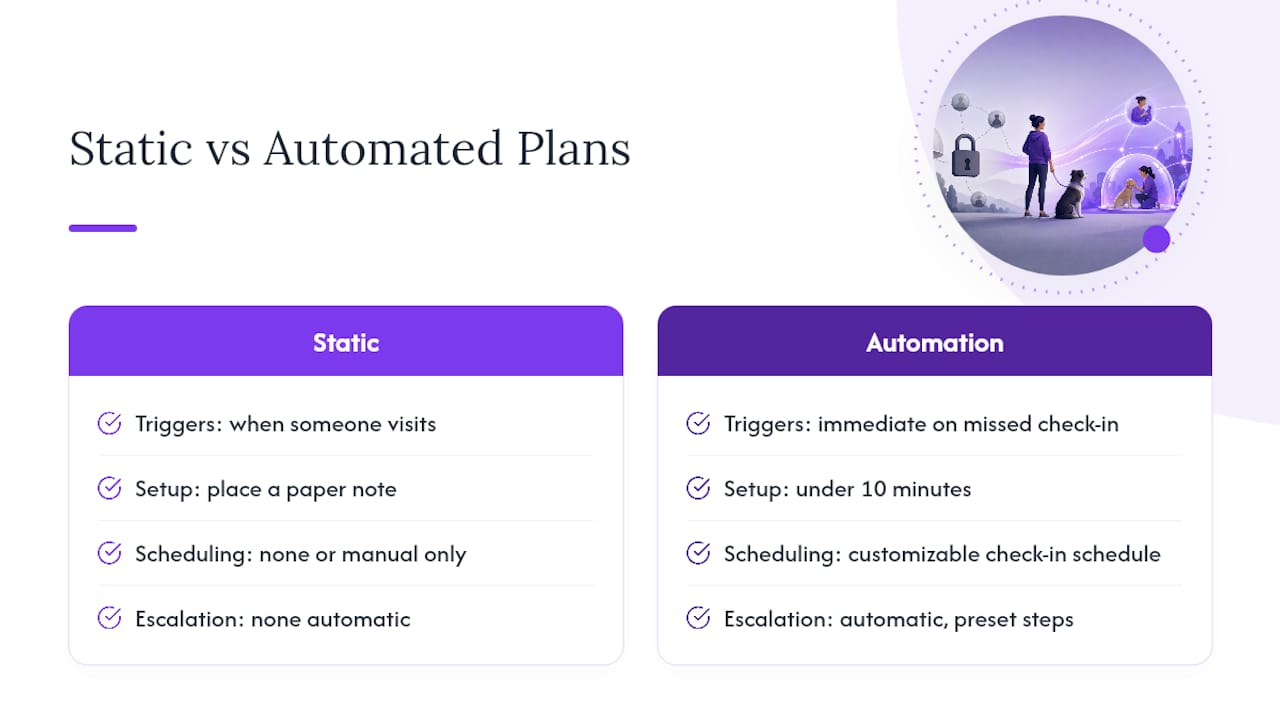
Static plans fail quietly. A card on the fridge, a note in a drawer, a contact list nobody’s checked in two years, none of that triggers when you actually need it. Automation solves the real problem, which isn’t information, it’s timing. Scheduled check-ins that escalate on a set window mean someone gets notified the moment you stop responding, not whenever they happen to visit.
MyPetsSafetyNet was built around that gap. Setup takes under 10 minutes, no smartphone required, and you can customize your check-in schedule, escalation steps, and contact list for up to five pets and three emergency contacts. Pair your digital alerts with a free pet wellness check-in card for a physical backup that lives in your kit.
— MyPetsSafetyNet
Set Up Your Emergency Contact Order Today
A subscription service runs quietly in the background, sending scheduled SMS, phone, or email check-ins, and if you don’t respond, it notifies your named contacts with your pet’s care instructions attached. No smartphone is required, no complicated app to learn, just answer a text or call to confirm you’re okay.

Setup takes less than 10 minutes. You choose your check-in schedule, your escalation steps, and up to three emergency contacts for up to five pets. Start with a 7-day free trial, no credit card required, and if you want a no-cost first step before subscribing, grab the free pet wellness check-in card to post at home today. When you’re ready for the full automated system, monthly plans start at $6.99. Build your pet’s profile, name your contacts, and run your first test check-in this afternoon, not someday.
Where to Find Official Pet Emergency Planning Resources
For deeper checklists and downloadable forms, the AVMA’s downloadable pet emergency card is designed to be carried or posted visibly. The ASPCA’s planning guide covers caregiver selection in more depth, and Ready.gov’s pet preparedness page offers FEMA-backed evacuation and alert guidance.
Sources
- Making a Plan for Your Pet | ASPCA
- Ensuring your pet is protected when you’re away | American Veterinary Medical Association
FAQ
What Is an Emergency Contact Order for Pets?
It’s an automated wellness check-in system that sends you scheduled messages and, if you don’t respond, notifies your named emergency contacts along with your pet’s specific care instructions. MyPetsSafetyNet runs this through SMS, phone calls, or email, so no smartphone is required.
How Many Emergency Contacts Should I List?
Two to four contacts works best, layering a local primary contact, a nearby backup, and an out-of-area contact who can coordinate if the first two aren’t reachable. A 2021 ASPCA survey found that fewer than half of pet owners have any preparedness plan, which makes backup layering especially important for solo owners.
How Often Should I Test My Check-In System?
Test your setup every three to six months, and immediately after any change in address, phone number, or health status. A quick scheduled test that requires a one-tap response is enough to confirm your contacts and channels still work.
What Does MyPetsSafetyNet Cost?
MyPetsSafetyNet offers a monthly subscription at $6.99, with a 7-day free trial and no credit card required to start.
Who Should Have Authority to Approve My Pet’s Emergency Care?
Name one person as your final decision-maker, even if you list multiple emergency contacts, since the AVMA notes this prevents hesitation from delaying veterinary treatment. Give that person signed authorization along with your vet’s contact details and any treatment preferences you’ve already discussed.