What Is a Pet Information Binder for Solo Pet Owners?

A pet information binder, in its modern form, is a digital emergency pet profile paired with an automated wellness-check and escalation subscription. It stores your pet’s care details, checks in on you daily on a schedule you set, and automatically alerts your designated emergency contacts with your pet’s full care plan the moment you stop responding. Providers like MyPetsSafetyNet built this exact model because a static document only helps if someone remembers to open it. A live system that reaches out to you first, then to your backup contacts, closes the gap that a folder in a drawer never could.
Key Takeaways
A pet information binder works because it replaces a static document with a scheduled, automated check-in that alerts real people the moment you go silent.
| Point | Details |
|---|---|
| Digital beats paper | An automated check-in reaches contacts within minutes, not whenever someone remembers to look. |
| Escalation order matters | Set retries and a contact order so the right person gets alerted first. |
| Test before you trust it | Run a live test alert and confirm every contact can open the instructions. |
| Update on a schedule | Revise medication and routine details every three months or after any change. |
| MyPetsSafetyNet fits this model | Its free trial gives you profiles, escalation, and test mode for up to five pets and three contacts. |
Pro Tip: Set a recurring calendar reminder to re-run your test alert every quarter, not just when you first set it up. Contacts change phones, jobs, and addresses more often than you’d expect.
Table of Contents
- What Is a Pet Information Binder, and What Does It Include?
- How Does an Automated Pet Wellness Check Work?
- Who Actually Needs This Kind of Pet Safety Net?
- What to Include in Your Pet Binder Profile
- How Do You Set Up a Pet Information Binder?
- Is a Digital Pet Binder Private and Secure?
- What Does a Pet Wellness-Check Subscription Cost?
- What Questions Should You Ask Before Choosing a Provider?
- Why We Built This Around Automation, Not Paperwork
- Get Protected With MyPetsSafetyNet’s Free Trial
What Is a Pet Information Binder, and What Does It Include?
The term has drifted from its origin as a physical folder of vet records into something more useful for solo owners: a living, subscription-based safety net. Every strong version of it includes six components working together.
Pet profiles hold the information a stranger would need to walk in cold and take over care: your pet’s name, species and breed, medical conditions, medication doses and timing, feeding schedule, behavior quirks (does she bite when scared, does he need a slow introduction), a current photo, and microchip number.
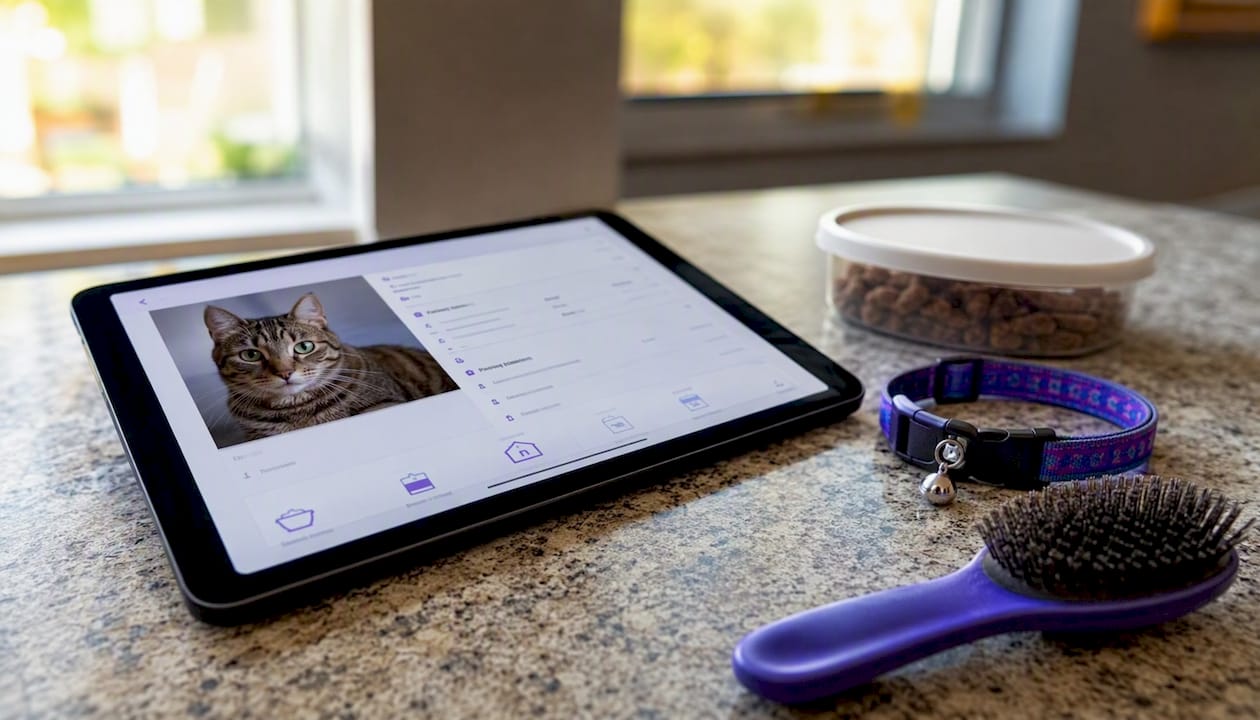
Contact management lets you list a primary contact and at least two backups, plus your vet’s phone number, a boarding facility, and a trusted neighbor. Scheduled check-ins run on a cadence you pick, daily is standard, delivered by SMS, phone call, or email, with a response window you control.
The escalation workflow is what separates a real system from a reminder app: if you miss the window, it retries, then moves down your contact list in order, delivering the full pet-care plan to whoever answers. Access and delivery options matter too. A secure link or access code lets a contact retrieve instructions instantly without downloading anything.
Administrative features round it out: support for multiple pets, version history so you can update instructions as your pet ages, a test mode, and an audit log showing exactly when each check-in and alert fired.
| Component | What It Does |
|---|---|
| Pet profile | Stores meds, feeding, behavior notes, and photos in one place |
| Contact list | Holds a primary contact plus backups, vet, and boarding info |
| Check-in schedule | Confirms you’re okay on a set cadence with a response window |
| Escalation workflow | Retries, then alerts contacts in order with full pet details |
| Access delivery | Sends a secure link or code so contacts can act immediately |
| Test mode | Lets you verify the whole chain before you rely on it |
Pro Tip: Update your pet’s profile every time a medication dose changes, not just once a year. A missed dosage update is the single most common reason emergency instructions go stale.
How Does an Automated Pet Wellness Check Work?
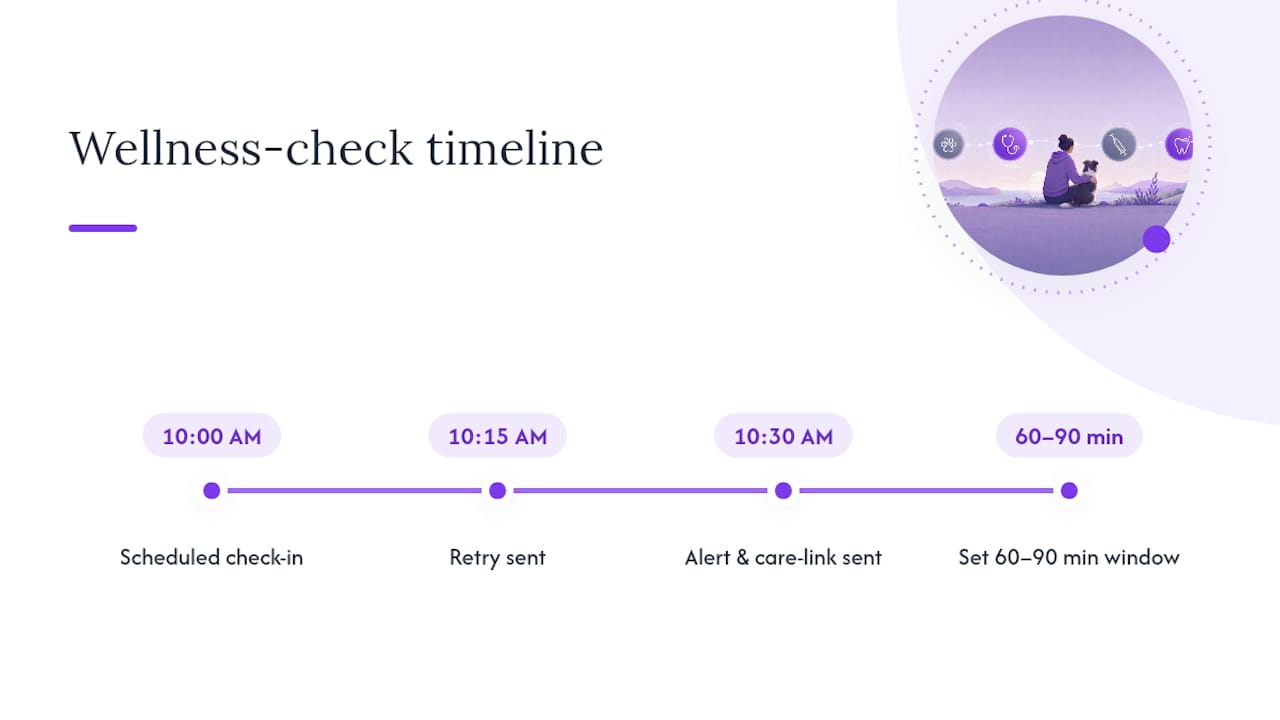
The flow is simple: a scheduled check-in goes out, you don’t reply, the system retries, and if you still don’t respond, your contacts get alerted with your pet’s full care plan. That’s the entire mechanism, and it’s designed to run without you touching it.
Here’s what that looks like on a real clock. Say your check-in fires at 10:00 AM. You don’t answer by 10:15, so the system sends a retry. By 10:30, with still no response, it notifies your primary contact and your first backup simultaneously, delivering a secure link with feeding instructions, medication schedule, vet contact, and any access notes you’ve stored. Similar wellness-check platforms, including KinKeeper, follow this same retry-then-alert pattern and are explicit that it’s a daily wellbeing check, not an emergency dispatch service.
The gap between “someone will notice eventually” and “someone was notified within thirty minutes” is the entire value of automating this. Most informal arrangements, a neighbor who promised to check, a friend who has a key, fail exactly because nobody defines the timing.
Delivery channels matter because contacts respond differently. SMS gets read fastest for most adults under 60; a phone call reaches someone driving or at work; email works as a backup that also creates a written record. Whichever channel fires, your contact receives a link to the full care plan and clear next steps, not a vague “please check on Sarah” text.
Pro Tip: Set your response window to at least 60 to 90 minutes if you work in an environment with poor cell reception, and name a neighbor with a spare key as a backup contact, not just a family member who lives across town.
One clarification worth stating plainly: this is not a 911 dispatch service. It notifies the people you’ve chosen. It does not call emergency services on its own, and it won’t replace a formal medical alert device if you have a condition that requires immediate first response.
Who Actually Needs This Kind of Pet Safety Net?
Five groups benefit most: solo pet owners with no one checking in daily, people managing a chronic illness, older adults living alone, frequent travelers, and night-shift workers whose schedules don’t match a typical welfare check.
- Solo owners living alone. If you collapse from a medical event on a Tuesday afternoon, nobody notices until you miss a shift or a call goes unanswered for days. An automated check-in shrinks that window to hours.
- People with chronic illness. A diabetic episode or a cardiac event can leave someone unresponsive but not hospitalized for a stretch of time. MyPetsSafetyNet’s guide on hospitalization scenarios walks through exactly how a prepared Care Circle handles this.
- Older adults living independently. Adult children who live far away get real peace of mind from knowing a missed check-in triggers an alert rather than depending on a weekly phone call.
- Frequent travelers. Anyone who leaves pets with a sitter for work trips benefits from a system that also confirms the sitter is following the routine, not just that the owner is safe.
- Night-shift and irregular-schedule workers. A daytime welfare check misses people who sleep at odd hours; a flexible check-in window solves that mismatch.
Pro Tip: Name a temporary caregiver, someone who can feed and walk your pet within hours, separately from a long-term guardian, someone who’d take the pet permanently if you were unavailable for weeks. Conflating the two roles is the most common setup mistake.
What to Include in Your Pet Binder Profile
The single most important items are medication details, feeding instructions, home access notes, and your vet’s contact information. Everything else supports those four.
Organize the profile into six categories: ID and basics (name, species, breed, microchip number, photo); health and medications (conditions, drug names, dosages, and timing); daily routine (feeding amounts, walk schedule, litter box habits); access instructions (lockbox code, hidden key location, alarm codes); legal and ownership notes (your name as owner, any co-owner, insurance policy number); and emergency preferences (preferred vet versus emergency clinic, whether to board or keep the pet at home).
| Category | Example Fields |
|---|---|
| ID & basics | Name, breed, microchip number, current photo |
| Health & meds | Conditions, medication names, doses, timing |
| Daily routine | Feeding amounts, walk schedule, litter habits |
| Access instructions | Lockbox code, key location, alarm code |
| Legal & ownership | Owner name, co-owner, insurance policy number |
| Emergency preferences | Preferred vet, emergency clinic, boarding vs. home |
A sample entry might read: “Milo is a 7-year-old tabby with mild kidney disease. He gets a half-tablet of Semintra each morning mixed into wet food, feeds twice daily at 7 AM and 6 PM, and needs the litter box scooped daily or he’ll avoid it. The lockbox code is on file; our vet is Riverside Animal Hospital.” MyPetsSafetyNet’s guide on writing caregiver instructions offers more phrasing examples that translate cleanly into a digital profile field.
Pro Tip: Write instructions the way you’d explain them to a stranger over the phone, not the way you’d remind yourself. “Half a Semintra tablet in wet food” beats “give him his pill.”
How Do You Set Up a Pet Information Binder?
Follow these steps in order and you’ll be protected within a single session.
- Sign up for an automated check-in service and verify your phone number and email.
- Create a profile for each pet, filling in medical, feeding, and behavior fields.
- Add a primary contact plus two backups, including at least one neighbor with physical access.
- Set your check-in time and choose a response window that fits your schedule.
- Configure retry timing and the order in which contacts get alerted.
- Attach access notes, lockbox codes, or key locations to each contact record.
- Enable test mode before relying on the system for real.
Testing matters as much as setup. Run a live test alert, confirm each backup contact actually received the message and can open the link, then revise anything that reads as unclear once someone outside your head reads it. MyPetsSafetyNet’s checklist on emergency documents is a useful companion for this step, since it flags the details owners forget most often.
- Send a test alert to your full contact list.
- Confirm each contact opened the link and understood the instructions.
- Revise unclear wording based on their feedback.
- Set a recurring reminder to review the profile every three months.
Pro Tip: Review and update your pet’s profile every time you change vets, medications, or your work schedule, not just on a fixed annual date.
Is a Digital Pet Binder Private and Secure?
Your data should be encrypted in storage and shared only with the contacts you’ve explicitly authorized, nobody else gets access to your pet’s profile or your check-in history. That’s the baseline any legitimate provider should meet.
Beyond encryption, look for two-factor authentication on your account, secure one-time links rather than email attachments that anyone could forward, and a clear retention policy stating how long your data stays on file if you cancel.
- Use a unique, strong password and enable two-factor authentication if it’s offered.
- Prefer services that send secure, time-limited links over plain email attachments.
- Ask what happens to your data if you cancel your subscription.
- Confirm which contacts can see your check-in history versus just the pet profile.
On the legal side, giving a contact your lockbox code or key location authorizes them to enter your home for pet care, but it doesn’t grant broader legal authority over your affairs. Rules on property entry and liability vary by state, so this is general guidance, not legal advice specific to your situation; confirm anything unusual with a local attorney if you share access with someone outside your household.
Pro Tip: Keep a signed, dated note authorizing home access for pet care, and have a separate conversation with your named guardian about longer-term decisions if you’re unavailable for an extended period.
What Does a Pet Wellness-Check Subscription Cost?
Expect a free trial followed by a monthly subscription, with most providers activating full protection within about 30 minutes of finishing setup. There’s no waiting period once your profile and contacts are in place.
Price scales with a handful of factors: the number of pets on your account, how many emergency contacts you add, which delivery channels you enable (SMS alone costs less than SMS plus phone plus email), and premium features like extended retry windows or phone support.
| Cost Factor | What It Changes | Effect on Timeline |
|---|---|---|
| Number of pets | More profiles to maintain and update | Adds setup time, not activation delay |
| Number of contacts | More people in the escalation chain | Slightly longer initial contact setup |
| Delivery channels | SMS, phone, and email cost differently | No impact once channels are enabled |
| Premium features | Extended retries, phone support | Can lengthen the escalation window itself |
A realistic path looks like this: sign up, build your pet profile, add contacts, run a test alert, confirm it worked, and you’re actively monitored the same day. MyPetsSafetyNet’s signup page lays out the free trial and monthly billing model, along with the plan limits of up to five pets and three emergency contacts.
What Questions Should You Ask Before Choosing a Provider?
The most important question you can ask is exactly how retries and escalations work and precisely what your contacts receive when they’re alerted. If a provider can’t answer that clearly, keep looking.
- Does the service offer a test mode before you rely on it for real?
- How long between a missed check-in and the first retry, and how many retries happen?
- What information, exactly, is delivered to a contact when they’re alerted?
- What’s the maximum number of pets and contacts allowed on your plan?
- Can you export your pet’s profile if you switch services later?
Watch for these red flags:
- No test mode, meaning you can’t verify anything before an emergency.
- Vague or undisclosed escalation timing.
- No clear answer on what data contacts actually see.
- A paywall that blocks testing before you commit to a plan.
- No U.S.-based support if something goes wrong during setup.
Ask these questions directly on a signup call or in chat before you commit, and treat hesitation or vague answers as a reason to walk away.
Why We Built This Around Automation, Not Paperwork
We’ve spent years producing emergency-preparedness content for pet owners, and the pattern is consistent: the owners who get burned aren’t the careless ones, they’re the organized ones who wrote everything down and then assumed someone would find it in time. A binder on a shelf depends on a stranger knowing it exists.
That’s why our guides on hospitalization scenarios and emergency document essentials keep circling back to the same point: information only helps if it reaches someone at the right moment. Automation solves the timing problem paperwork never could. We test our own escalation flows regularly and update guidance as check-in technology improves, because a system nobody has verified is just a more expensive folder.
Get Protected With MyPetsSafetyNet’s Free Trial
MyPetsSafetyNet delivers exactly the feature set this article describes: automated check-ins, detailed pet profiles, an ordered escalation workflow, and a test mode you can run before you ever depend on it. Compared to piecing together a manual system of texts and reminders, it removes the single point of failure, your own memory, and replaces it with a schedule that runs whether you’re having a good week or a hard one.

Your account supports up to five pets and three emergency contacts, with check-ins delivered by SMS, phone, or email and retries that escalate in the order you set. The free trial gives you room to build your first pet profile, add your contacts, and run a live test alert before monthly billing starts, so you know it works before you rely on it. Start by creating your first pet profile and sending a test check-in today.