Life Station Alert: How Solo Pet Owners Set One Up
A life station alert is an automated wellness check-in that pings you daily by SMS, phone, or email and notifies your emergency contacts with pet-care details if you don’t respond. If you live alone with a pet, your next move is straightforward: sign up for a free trial with a service like MyPetsSafetyNet, add at least two emergency contacts within the next 30 minutes (one who lives close enough to reach your home fast), and build a pet profile with feeding and medication notes. Then get written veterinary authorization on file, using a resource like PetNPrep’s emergency plan guidance as a template, so a backup caregiver isn’t turned away at the clinic door.
That’s the whole idea in one paragraph. Everything below explains how the mechanics work, what these systems actually guarantee, and how to configure one so it doesn’t fail your pet when it matters.
Key Takeaways
A life station alert works by pairing a daily check-in prompt with an automated escalation chain, and its entire value comes from shortening the time between an emergency and someone finding out about it.
| Point | Details |
|---|---|
| Core function | A missed check-in triggers an automated alert to emergency contacts with pet-care details attached. |
| Discovery window | Daily check-ins shorten discovery from days to hours by giving contacts an automatic trigger. |
| Redundancy matters | List at least two backup contacts, prioritizing one who can reach your home quickly. |
| Vet authorization | Store written permission for backup caregivers so clinics don’t delay non-emergency care. |
| Get started | MyPetsSafetyNet offers a free trial, customizable countdowns, and pet-profile tools built for this exact scenario. |
Table of Contents
- How Does a Life Station Alert Actually Work?
- What These Services Actually Deliver (and What They Don’t)
- How Do You Choose the Right Life Station Alert Service?
- What Should You Set Up Right Now?
- What Do Life Station Alert Plans Typically Cost?
- MyPetsSafetyNet: A Life Station Alert Built for Pet Owners
- Why We Built This Around the Discovery Window
- Sources
How Does a Life Station Alert Actually Work?
The mechanics are simple by design, because the moment you need one, you won’t be in a position to troubleshoot software. A wellness check-in service prompts you daily for a response, and if you fail to reply within a countdown window you set yourself, it escalates to the people you’ve named to step in.
The flow breaks down into four stages:
- Prompt: You receive a scheduled message by text, phone call, or email asking you to confirm you’re okay.
- Countdown: If you don’t respond, a timer you configured (an hour, several hours, or a full day) starts running.
- Automated alert: Once the countdown lapses, the system sends a notification to your designated emergency contacts.
- Escalation: If your primary contact doesn’t acknowledge the alert, it moves down the list to backup contacts, often with pet-care instructions attached automatically.
| Step | What Happens | Typical Timing |
|---|---|---|
| Daily prompt | You get an SMS, call, or email check-in request | Immediate, at a set time you choose |
| Missed response | Countdown timer begins | Starts the moment the window opens |
| Automated alert | Contacts receive a notification with pet details | Within hours of a missed check-in |
| Escalation | Backup contacts are alerted if the first doesn’t respond | Minutes to hours, depending on configuration |
The core function is closing what amounts to a discovery gap. Without a check-in system, a solo pet owner who has a fall, a medical event, or a hospital stay might not be found for days, and a pet with no food or water suffers the entire time. A structured check-in shortens that gap from days to hours, because someone is looking for you long before a landlord or neighbor happens to notice something’s wrong.
When you compare services, look past the basic ping-and-alert function. The stronger providers let you customize countdown length by day of week, support more than one or two backup contacts, and include actual pet-profile fields, not just a generic “emergency contact” slot.
What These Services Actually Deliver (and What They Don’t)
A life station alert earns its keep in a narrow but critical job: getting a real human to your pet fast. It does not replace broader legal or medical planning, and treating it as a cure-all is where people get into trouble.
Here’s what a well-configured check-in system reliably provides:
- A shortened discovery window. Instead of a welfare check triggered by an overdue rent payment or a worried relative, the alert fires quickly after you go quiet.
- Automatic delivery of care instructions. Your contact doesn’t have to guess your dog’s medication schedule. It’s already in the alert.
- Multiple chances for someone to respond. Escalation to a second or third contact means one person’s busy day doesn’t leave your pet stranded.
- A documented trigger point. You know exactly when and how the system decided something was wrong, which matters if you ever need to review what happened.
What it isn’t: a substitute for a legal pet trust or a formal guardianship arrangement, and it’s not a 24/7 in-home medical response service. If you have a health condition that requires active monitoring, a life station alert pairs well with medical device alerts or even emerging tools that track a pet’s own activity and gait for early signs of illness, since proactive pet-health monitoring solves a different problem than yours does. One watches you; the other watches your pet’s health day to day. They’re complementary, not interchangeable.
Pro Tip: Don’t rely on a single emergency contact, even a great one. People travel, change phone numbers, or simply don’t see a notification in time. List at least two backups, and structure your countdown so escalation happens automatically rather than waiting on you to manually loop someone in.
One overlooked detail: veterinary clinics often won’t authorize non-emergency treatment for a pet brought in by someone other than the registered owner. If your backup contact shows up with your cat and the clinic can’t verify permission, care gets delayed exactly when speed matters most. Store written veterinary authorization where your emergency contacts can find it, not buried in a file only you know about.

How Do You Choose the Right Life Station Alert Service?
Not every check-in app is built with pets in mind, and the gaps show up exactly when you need the system most. Run through this checklist before you commit to a provider:
- Escalation workflow. Does it move automatically to a second and third contact, or does it stop after one unanswered alert?
- Contact limits. Can you list multiple emergency contacts, or does the plan cap you at one?
- Countdown configurability. Can you adjust the response window for weekdays versus weekends, or for travel?
- Pet-profile depth. Does it store medications, feeding schedules, and vet contact info, or just a name and species?
- Vet-authorization support. Does the service help you document or attach written permission for a caregiver?
- Privacy and data handling. How is your contacts’ phone and email information stored and used?
- Testing tools. Can you run a simulated missed check-in to confirm everything works before you actually need it?
Once you’ve narrowed your options, ask the provider directly: What’s the maximum number of backup contacts? Is there a documented escalation log I can review? How is SMS consent handled for the people I’m notifying?
Then ask your emergency contacts a different set of questions: Are you generally available during the countdown window I’ve set? Do you have a way into my home, whether that’s a spare key or a lockbox code? Are you willing to authorize non-emergency veterinary care if my pet needs it?
A few red flags should send you looking elsewhere:
- Systems that support only one emergency contact with no backup option.
- No test mode, meaning your first real check-in is also your first real test.
- Missing pet-profile fields, forcing you to cram feeding instructions into a notes box.
- Subscriptions that are simple to start and deliberately hard to cancel.
Trust signals worth weighing in the other direction include a free trial period, support for multiple contacts, a pet-care instruction card generator, and clear documentation of how escalation and consent actually work under the hood.
What Should You Set Up Right Now?
Most of the value in a life station alert comes from setup quality, not the app itself. A perfectly configured system with vague instructions and unreachable contacts will still fail your pet. Work through this checklist in order:
- Create a pet profile. Include species, breed, weight, and any behavioral notes a stranger would need to know.
- Upload medication and feeding details. List dosages, timing, and where supplies are stored.
- Add your veterinarian’s contact information. Include the clinic name, phone number, and address.
- Designate a primary contact and at least one backup. Prioritize someone who lives close enough to respond within roughly 30 minutes.
- Share access instructions. A spare key, a lockbox code, or a neighbor who holds a key all work.
- Print a pet-alert card. Post it near your front door so first responders know a pet is inside, since emergency services generally won’t search for pets unless alerted.
- Draft a short written vet authorization. State clearly that your named backup caregiver can approve non-emergency treatment in your absence.
| Task | Where to Store It | Who to Notify |
|---|---|---|
| Pet profile & medications | Life station alert app | Emergency contacts |
| Vet authorization letter | With your vet and your primary contact | Veterinary clinic |
| Spare key or access code | With your closest backup contact | Backup caregiver |
| Printed pet-alert card | Near your front door | First responders |
Your vet-authorization note doesn’t need to be a legal document. A comprehensive emergency pet care plan should name your primary caregiver, at least one backup, and include plain language stating that clinic can accept instructions from either person for non-emergency care. Keep a copy with your vet’s file and another with your primary contact.
Before you consider the setup finished, run a live test. Trigger a missed check-in on purpose, confirm the escalation message reaches your backup contact, and verify that person actually knows how to get into your home. A test that reveals a gap now is far better than one that reveals it during a real emergency.
What Do Life Station Alert Plans Typically Cost?
Most services follow a similar shape: a free trial period, followed by a monthly subscription once you decide to keep it running.
- Trial lengths vary, but most give you enough time to run a real end-to-end test with your contacts before paying anything.
- Monthly pricing usually scales with features rather than raw usage, so a basic plan may cap you at fewer pets or contacts.
- Some plans distinguish between SMS-only check-ins and ones that include phone-call escalation, which matters if a contact is more likely to notice a call than a text.
What actually affects reliability isn’t the sticker price. It’s the plan limits underneath it: how many pets you can register, how many emergency contacts you’re allowed, and whether testing credits are included so you can rerun a simulation after you add a new contact.
Before subscribing, confirm exactly when your free trial ends and what happens if you don’t cancel. A provider that makes cancellation simple and states its terms clearly is worth more than one offering a slightly lower monthly rate.
Pro Tip: Compare plans by contact and pet limits first, price second. A cheaper plan that caps you at one emergency contact defeats the entire purpose of building redundancy into your safety net.
MyPetsSafetyNet: A Life Station Alert Built for Pet Owners
MyPetsSafetyNet was built specifically around the scenario this article walks through: a solo pet owner who needs a reliable way to guarantee their pet gets found and cared for if something happens to them.

The service covers the features that matter most for actually getting help to your pet, not just to you:
- Daily check-ins by SMS, phone, or email with a countdown window you control.
- Support for multiple backup contacts, so escalation doesn’t stop after one unanswered message.
- Pet-profile fields covering feeding schedules, medications, and vet contact information.
- A pet-alert card generator you can print and post at your front door.
- Tools to document veterinary authorization so backup caregivers aren’t turned away at the clinic.
- A free trial so you can test the entire flow before committing to a subscription.
Getting started takes about ten minutes: sign up, build your pet’s profile, add your emergency contacts, confirm your SMS consent, and run a test check-in to see the escalation in action. Your contacts’ information is handled according to the same consent flow you set up during signup, so nothing gets shared without your say-so.
If you’ve read this far, you already know what your pet needs. Start your free trial today and add your first two emergency contacts before you close this tab.
Why We Built This Around the Discovery Window
Most pet-emergency advice focuses on what to do after someone finds you. That’s backwards. The real failure point in nearly every worst-case scenario we’ve studied isn’t a lack of planning. It’s the absence of a trigger that tells anyone to look.
We built MyPetsSafetyNet around solo pet owners specifically because this population faces the sharpest version of the problem. An elderly reader living alone with a cat, or a disabled reader managing a chronic condition, doesn’t have a spouse who notices when something’s off. The gap between “something happened” and “someone knows” can stretch for days, and a pet has no way to signal for help on its own.
We’ve heard variations on the same pattern from users: a missed check-in fires, a backup contact gets the alert within a couple of hours, and that contact arrives to find the owner needs medical attention and the pet needs feeding, both resolved the same day instead of days later. That outcome depends entirely on setup quality: contacts who actually respond, access arranged in advance, and a countdown window that matches the owner’s real routine.
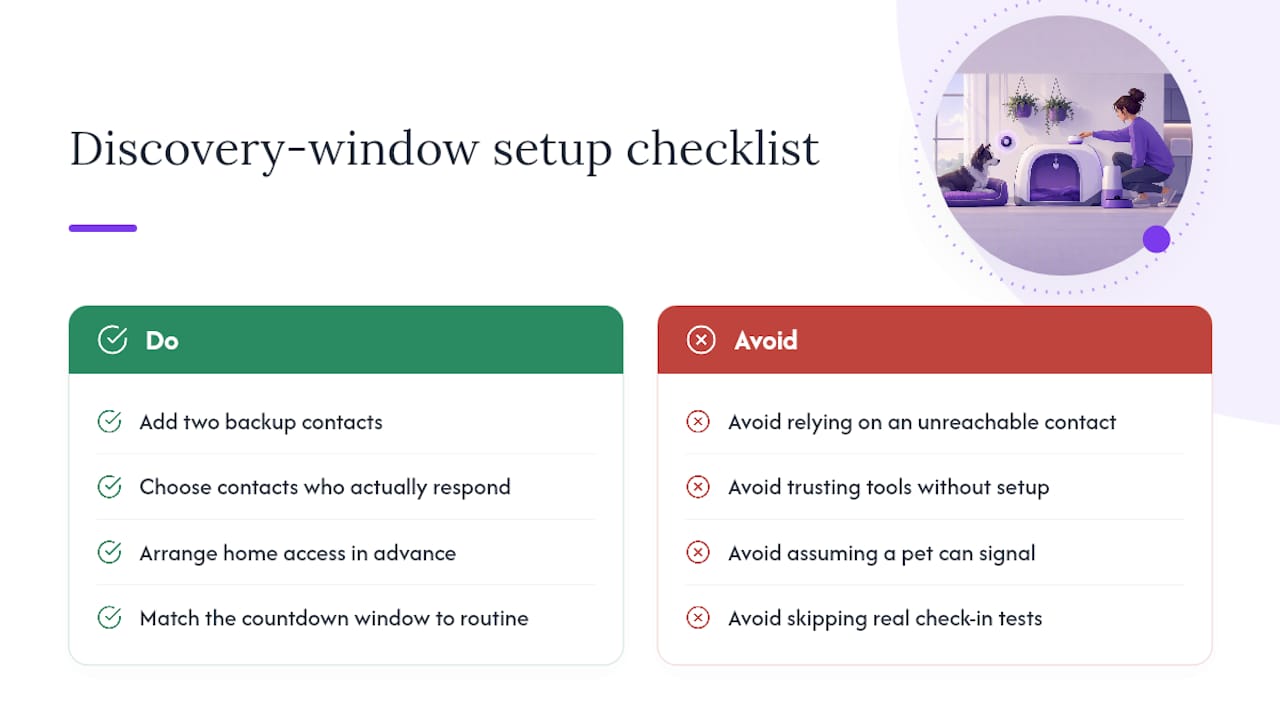
The tools matter less than the discipline behind using them. A perfectly built check-in system paired with an unreachable emergency contact is functionally useless. The setup work described earlier in this piece, adding two contacts, documenting vet authorization, running a real test, is what turns a notification feature into an actual safety net.
Sources
- Petnprep